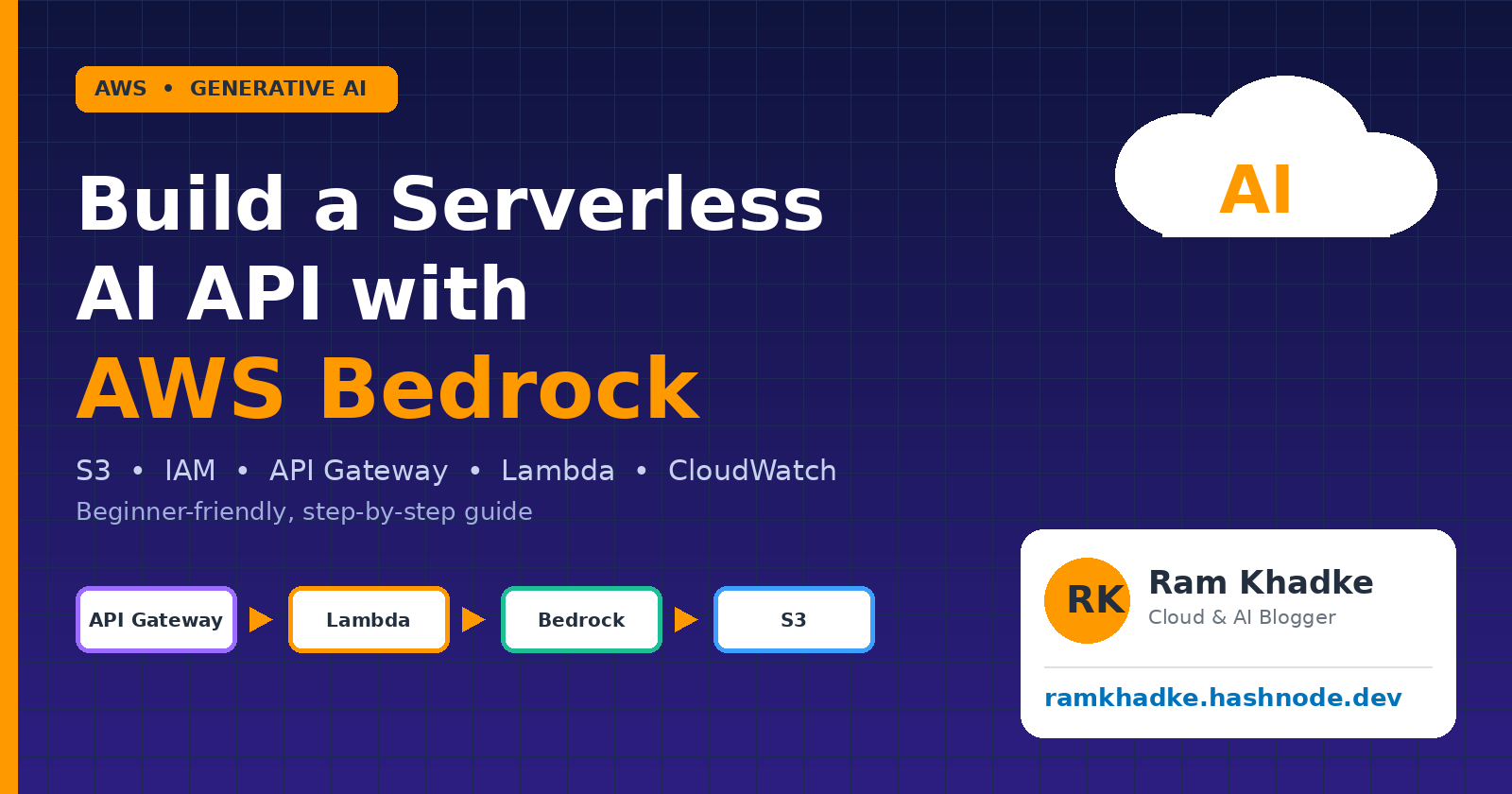
Build a Serverless AI API with AWS Bedrock
A beginner-friendly, step-by-step guide using S3, IAM, API Gateway, Lambda and CloudWatch Level: Beginner to Intermediate
What you will buildA public HTTPS endpoint. You send it a question, it asks a foundation model on Amazon Bedrock, returns the answer, and saves a copy to S3. Every request is logged in CloudWatch. No servers to manage, and the cost of a test run is a few cents.
What you will learn• What Amazon Bedrock is and how to enable a model
• How IAM roles give Lambda safe, minimal permissions
• How to write a Lambda function that calls Bedrock with the
Converse API• How to expose it with API Gateway and test it with curl
• How to read logs and set an alarm in CloudWatch
• Common errors, cost control and clean-up
1. Introduction --
Generative AI is no longer only for big research teams. With Amazon Bedrock, you can use powerful foundation models from providers such as Amazon, Anthropic and Meta through one simple AWS API. There are no GPUs to rent and no model to host. You send text, and you get text back.But a model on its own is not an application. Real projects need storage, security, a web endpoint and monitoring. This guide connects those pieces one at a time, and explains why each one is there, so that you can reuse the pattern for chatbots, summarizers, content tools and more.
Who is this guide for?
Beginners: every click is explained, and the code is ready to copy.
Experienced engineers: use it as a clean reference architecture, then extend it with Guardrails, Cognito, or Knowledge Bases (see the last section).
2. Architecture and Services --
Here is the full picture. A request travels left to right, and the IAM role decides what Lambda is allowed to touch.
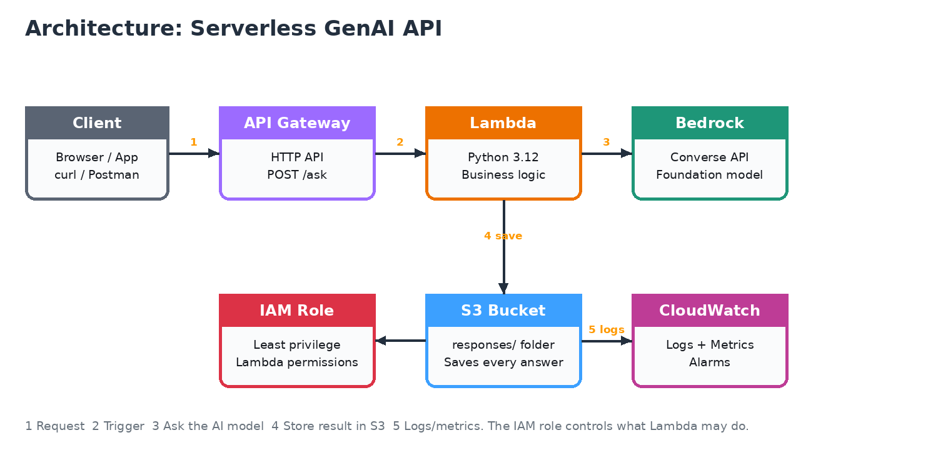
Service | Role in this project | Why we need it |
Amazon Bedrock | The AI brain | Gives API access to foundation models without hosting them. |
AWS Lambda | The logic | Runs our Python code only when a request arrives. You pay per use. |
API Gateway | The front door | Turns Lambda into a public HTTPS URL with throttling support. |
Amazon S3 | The storage | Keeps a JSON copy of every question and answer. |
AWS IAM | The security guard | Gives Lambda only the permissions it needs (least privilege). |
CloudWatch | The monitor | Collects logs and metrics. Lets you debug and set alarms. |
3. Before You Start --
• An AWS account (a new account is fine) with a payment method added
• Access to the AWS Management Console. Sign in as a user, not as the root user, when possible
• A terminal with curl (Mac and Linux have it; Windows 10/11 has it in Command Prompt) or Postman
• About 45 minutes
Use one region for everything --
Pick US East (N. Virginia) us-east-1 in the top-right region menu and keep it for all steps. Resources in different regions cannot see each other, which is the number one beginner mistake.
Names used in this guide. Replace the bucket name with your own, because S3 bucket names must be unique worldwide.
Item | Value |
S3 bucket | ram-bedrock-demo-<your-account-id> |
IAM role | BedrockLambdaRole |
Lambda function | bedrock-ask-function |
API | bedrock-ask-api (HTTP API) |
Model ID | amazon.nova-lite-v1:0 |
4. Step-by-Step Build --
Step 1: Protect your account and your wallet
Open IAM and turn on MFA (multi-factor authentication) for your user.
Open Billing and Cost Management → Budgets and create a monthly Cost budget of 5 USD with an email alert.
Switch the region to N. Virginia (us-east-1). #Why? Pay-per-use services are cheap, but a mistake such as an infinite loop can still surprise you. A budget alert is your free safety net.
Step 2: Check model access in Amazon Bedrock
Search for Bedrock in the console search bar and open it.
In the left menu open Model catalog.
Find Amazon Nova Lite. If it says Available (or shows an Enable or Request access button), enable it. Some providers, for example Anthropic, may ask for a short use-case form the first time.
Optional: open the Playground, pick the model and type a question, to confirm that it works before writing any code.
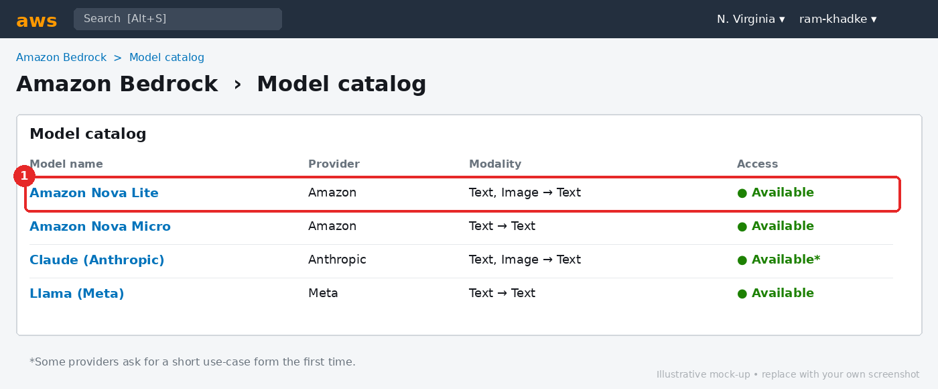
Note | Bedrock model names, availability and access screens change over time and differ by region. If your screen looks a little different, look for the same idea: the model must be enabled for your account in your region. Always copy the exact Model ID from the model page. |
Step 3: Create the S3 bucket
Open S3 → Create bucket.
Bucket name: ram-bedrock-demo- followed by your account number (it must be globally unique). Region: us-east-1.
Keep Block all public access turned ON. Keep default encryption (SSE-S3).
Click Create bucket.
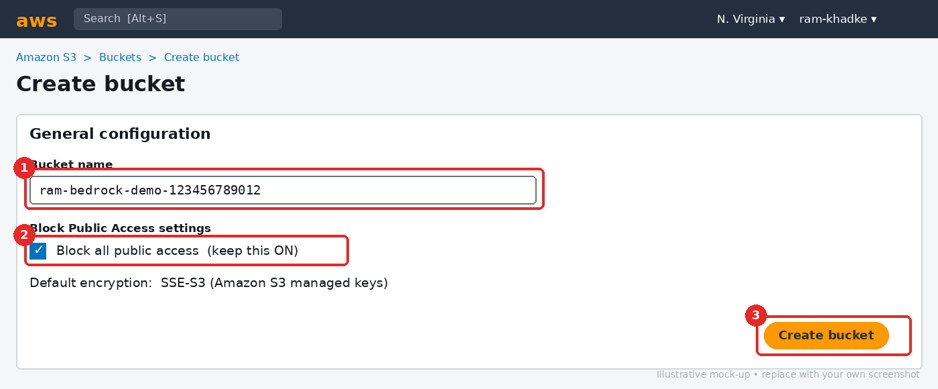
Security tip | Never make this bucket public. It stores user prompts, which may contain private information. |
Step 4: Create the IAM role for Lambda --
A role is like an ID card that Lambda wears while running. We will give it exactly three abilities: write logs, call Bedrock, and write to one S3 folder.
4.1 Create the role:
Open IAM → Roles → Create role.
Trusted entity: AWS service. Use case: Lambda. Click Next.
Attach the managed policy AWSLambdaBasicExecutionRole (this lets Lambda write logs to CloudWatch).
Name the role BedrockLambdaRole and create it. Behind the scenes, the console creates this trust policy, which says that the Lambda service may use the role:
{
"Version": "2012-10-17",
"Statement": [{
"Effect": "Allow",
"Principal": { "Service": "lambda.amazonaws.com" },
"Action": "sts:AssumeRole"
}]
}
4.2 Add the inline policy
Open the new role → Add permissions → Create inline policy → JSON tab.
Paste the policy below. Replace YOUR-BUCKET-NAME with your real bucket name.
Name it BedrockAndS3Access and save.
{
"Version": "2012-10-17",
"Statement": [
{
"Sid": "AllowBedrockInvoke",
"Effect": "Allow",
"Action": "bedrock:InvokeModel",
"Resource": "*"
},
{
"Sid": "AllowWriteResponses",
"Effect": "Allow",
"Action": "s3:PutObject",
"Resource": "arn:aws:s3:::YOUR-BUCKET-NAME/responses/*"
}
]
}
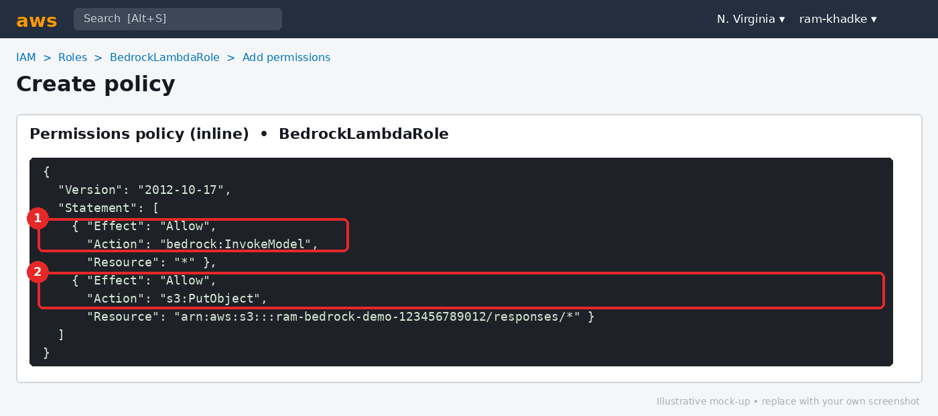
Least privilege
The S3 permission covers only PutObject inside the responses/ folder. Lambda cannot read, list or delete anything else. Once everything works, you can also narrow the Bedrock resource from * to the exact model ARN.
Step 5: Create the Lambda function --
Open Lambda → Create function → Author from scratch.
Name: bedrock-ask-function. Runtime: Python 3.12 (or newer). Architecture: x86_64.
Under permissions choose Use an existing role and select BedrockLambdaRole. Click Create function.
In the Code tab, replace everything in lambda_function.py with the code below, then click Deploy.
import json
import os
import uuid
import logging
from datetime import datetime, timezone

import boto3
from botocore.exceptions import ClientError

logger = logging.getLogger()
logger.setLevel(logging.INFO)

bedrock = boto3.client("bedrock-runtime")
s3 = boto3.client("s3")

MODEL_ID = os.environ.get("MODEL_ID", "amazon.nova-lite-v1:0")
BUCKET = os.environ["BUCKET_NAME"]


def reply(status, payload):
    return {
        "statusCode": status,
        "headers": {"Content-Type": "application/json"},
        "body": json.dumps(payload),
    }


def lambda_handler(event, context):
    # 1) Read and validate the request
    try:
        body = json.loads(event.get("body") or "{}")
    except json.JSONDecodeError:
        return reply(400, {"error": "Body must be valid JSON"})

prompt = (body.get("prompt") or "").strip()
if not prompt:
    return reply(400, {"error": "Please send a 'prompt'"})
if len(prompt) > 2000:
    return reply(400, {"error": "Prompt too long (max 2000 chars)"})

logger.info("prompt received, length=%d", len(prompt))

# 2) Ask the model through the Bedrock Converse API
try:
    response = bedrock.converse(
        modelId=MODEL_ID,
        messages=[{"role": "user", "content": [{"text": prompt}]}],
        inferenceConfig={"maxTokens": 512, "temperature": 0.5},
    )
except ClientError as e:
    code = e.response["Error"]["Code"]
    logger.error("Bedrock error: %s", code)
    return reply(502, {"error": "Model call failed", "code": code})

answer = response["output"]["message"]["content"][0]["text"]
usage = response.get("usage", {})
logger.info("model=%s tokens_in=%s tokens_out=%s",
            MODEL_ID, usage.get("inputTokens"), usage.get("outputTokens"))

# 3) Save the question and answer to S3
key = f"responses/{datetime.now(timezone.utc):%Y-%m-%d}/{uuid.uuid4()}.json"
s3.put_object(
    Bucket=BUCKET,
    Key=key,
    Body=json.dumps(
        {"prompt": prompt, "answer": answer, "model": MODEL_ID}
    ),
    ContentType="application/json",
)
logger.info("saved %s", key)

return reply(200, {"answer": answer, "saved_to": f"s3://{BUCKET}/{key}"})
5.1 Configure environment variables, timeout and memory
Configuration → Environment variables → Edit. Add BUCKET_NAME = your bucket name, and MODEL_ID = amazon.nova-lite-v1:0.
Configuration → General configuration → Edit. Set Timeout to 30 seconds and Memory to 256 MB.
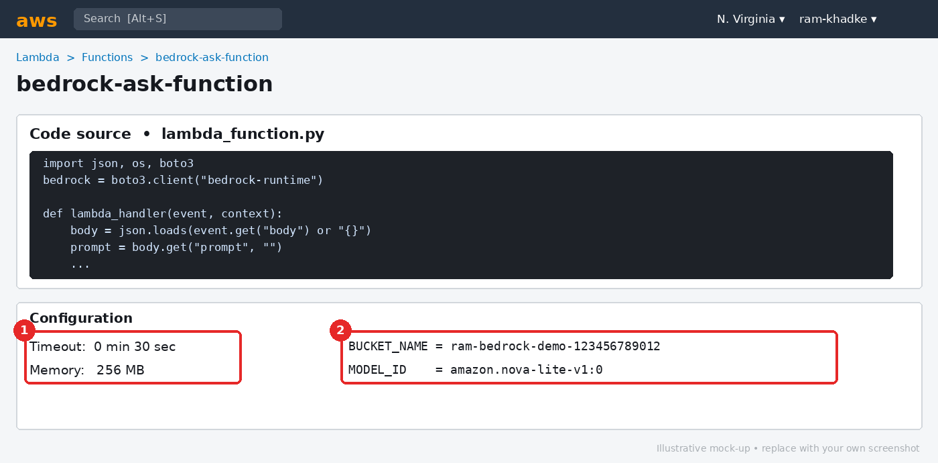
Most common beginner error Lambda's default timeout is only 3 seconds. AI models often need longer, so without this change you will see "Task timed out after 3.00 seconds".
Step 6: Test Lambda directly
Open the Test tab → Create new event → name it ask-test.
Paste the event below (it imitates what API Gateway will send) and click Test. { "body": "{"prompt": "Explain AWS Lambda in two lines"}" }
A green Succeeded box with statusCode 200 and an answer means Lambda, IAM and Bedrock are all working. If it fails, jump to the troubleshooting table in section 5 before going further.
Step 7: Create the API in API Gateway
Open API Gateway → Create API → HTTP API → Build.
Add integration: Lambda, and choose bedrock-ask-function. API name: bedrock-ask-api.
Configure routes: Method POST, Resource path /ask.
Keep the $default stage with auto-deploy on. Review and create.
Copy the Invoke URL shown on the API details page.
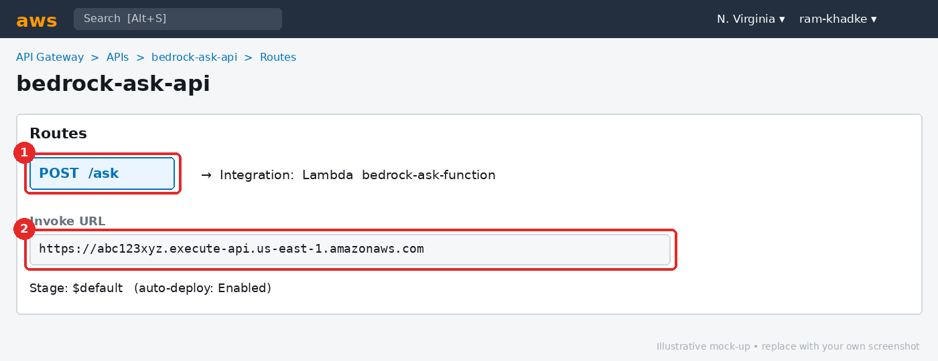
Why an HTTP API? HTTP APIs are simpler and cheaper than REST APIs and are enough for this use case. Choose a REST API later if you need features such as usage plans with API keys.
Step 8: Call your API from the terminal
Replace the URL with your own Invoke URL and add /ask at the end.
Mac, Linux or Git Bash
curl -X POST "https://abc123xyz.execute-api.us-east-1.amazonaws.com/ask" \
-H "Content-Type: application/json" \
-d '{"prompt":"Explain AWS Lambda in 2 lines"}'
Windows PowerShell
Invoke-RestMethod -Method Post `
-Uri "https://abc123xyz.execute-api.us-east-1.amazonaws.com/ask" `
-ContentType "application/json" `
-Body '{"prompt":"Explain AWS Lambda in 2 lines"}'
You should receive JSON with an answer and a saved_to path.
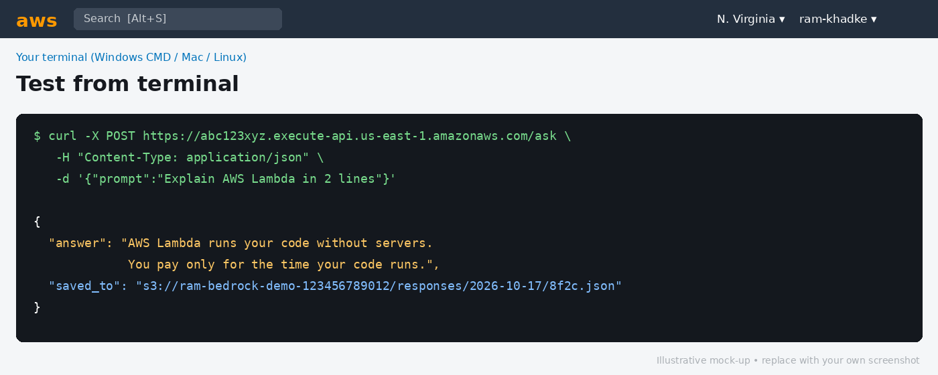
Step 9: Watch it in CloudWatch
Open CloudWatch → Logs → Log groups and click /aws/lambda/bedrock-ask-function.
Open the latest log stream. You will see START, your INFO lines, and a REPORT line with duration and memory used.
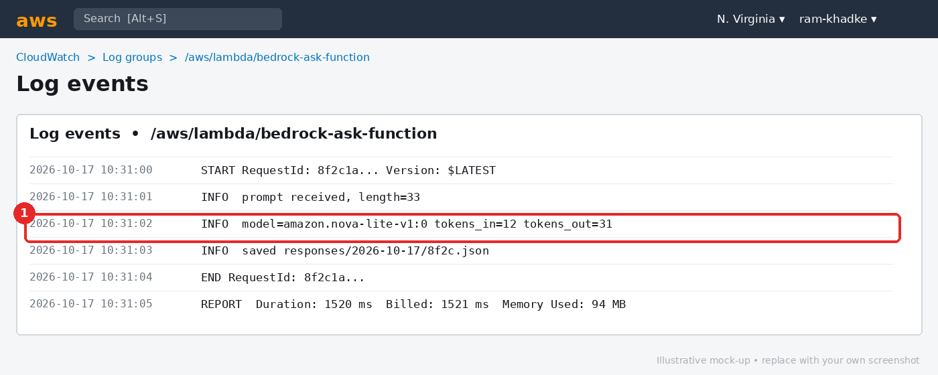
9.1 Useful Logs Insights query
Open Logs Insights, select the log group and run this to find recent errors:
fields @timestamp, @message
| filter @message like /ERROR|error/
| sort @timestamp desc
| limit 20
9.2 Create an error alarm (recommended)
CloudWatch → Alarms → Create alarm → Select metric → Lambda → By Function Name.
Choose Errors for bedrock-ask-function. Statistic: Sum. Period: 5 minutes.
Condition: Greater/Equal 1. Create a new SNS topic and enter your email. Confirm the email subscription. Now you get an email whenever your function fails.
Step 10: Confirm the answer was stored in S3
Open your bucket → responses/ → today's date folder.
Open a JSON file. It contains the prompt, the answer and the model used.
Congratulations! You have built a working, monitored, serverless AI API.
5. Troubleshooting Cheat Sheet
Error or symptom | Likely cause | Fix |
AccessDeniedException when calling InvokeModel | Model not enabled, or the role has no bedrock:InvokeModel | Re-check Step 2 and the inline policy in Step 4. |
Task timed out after 3.00 seconds | Default Lambda timeout | Set timeout to 30 seconds (Step 5.1). |
KeyError: 'BUCKET_NAME' | Environment variable missing | Add BUCKET_NAME in Configuration. |
AccessDenied on s3:PutObject | Wrong bucket name in the policy | Match the ARN exactly and keep /responses/* at the end. |
ValidationException: on-demand throughput isn't supported | This model needs an inference profile in your region | Use the profile ID, for example us.amazon.nova-lite-v1:0, and allow it in the IAM policy. |
404 or Not Found from the URL | Missing /ask or wrong method | Use POST and add /ask to the Invoke URL. |
502 Bad Gateway | Lambda returned a wrong response shape | Return statusCode and a string body, as in the sample code. |
6. Security, Cost and Clean-Up
Security checklist --
• Keep S3 Block Public Access ON and encryption enabled
• Use least-privilege IAM. Never put access keys in code or in the blog
• Your API is currently open to anyone who knows the URL. Before sharing it, add authentication (a Cognito JWT authorizer or IAM auth) and throttling on the stage
• Limit prompt size (the code already caps it at 2000 characters) and set maxTokens to control cost
• Consider Bedrock Guardrails to filter harmful or sensitive content
Cost tips --
• Bedrock is billed per input and output token. Small models such as Nova Lite are inexpensive for testing
• Lambda, API Gateway and S3 have tiny costs at low volume (check the free tier for your account)
• CloudWatch Logs are billed by data stored. Set the log group retention to 7 or 14 days
• Check current prices on the AWS pricing pages, because they change
Clean up when you are done --
Delete in this order to avoid leftover charges:
API Gateway: delete bedrock-ask-api
Lambda: delete bedrock-ask-function
CloudWatch: delete the log group and the alarm (and the SNS topic)
S3: empty the bucket, then delete it
IAM: delete BedrockLambdaRole
7. Where to Go Next
Idea | What it adds |
Bedrock Knowledge Bases | Chat with your own PDFs and documents (RAG). S3 is the data source. |
Bedrock Guardrails | Block unsafe topics and mask personal data. |
Amazon Cognito | Add user sign-in so only logged-in users can call the API. |
Streaming responses | Show the answer word by word using ConverseStream. |
DynamoDB | Store chat history per user for multi-turn conversations. |
AWS SAM or CDK | Deploy this whole project as code with a single command. |
Step Functions | Chain several AI steps, for example summarize, translate, then email. |
8. Key Takeaways
• Bedrock gives you a managed API to foundation models. You never host a model
• Lambda is the glue between the web request, the model and storage
• IAM roles keep it safe. Give only the permissions that are needed
• CloudWatch is your best friend when something breaks
• Start small, test each step separately, and clean up after practice
9. Frequently Asked Questions
Is this free? Not completely. Bedrock charges per token, but for a few test prompts the total is usually only cents. Always set a budget alert.
Can I use Claude or Llama instead of Nova? Yes. Enable the model in Bedrock, copy its Model ID into the MODEL_ID variable, and the same Converse API code works.
Do I need to know Python well? No. Copy the code as is, then change small things like the prompt or maxTokens to learn.
Can I build a chatbot UI on top of this? Yes. Any website or mobile app can call the /ask endpoint with a simple fetch request. Add CORS in API Gateway when calling from a browser.
About the author Ram Khadke writes practical Cloud, DevOps and AI tutorials for beginners and professionals. Read more articles at ramkhadke.hashnode.dev. If this guide helped you, share it with a friend who is starting with AWS, and drop your questions in the comments.
Happy building! ramkhadke.hashnode.dev
About the author
- DevOps Engineer - Professional with significant experience in optimizing cloud infrastructure and streamlining deployment pipelines. Strong focus on collaboration and achieving results, adaptable to evolving project needs. Skilled in CI/CD, configuration management, and automation tools. Reliable team player known for problem-solving and delivering impactful solutions. Handling security breaches, Application Workloads, Traffic Controls. Collaborating multiple teams and enjoy the movement.
Comments
Join the discussionNo comments yet. Be the first to comment.