The Ultimate DevOps Tools Cheat Sheet for 2026
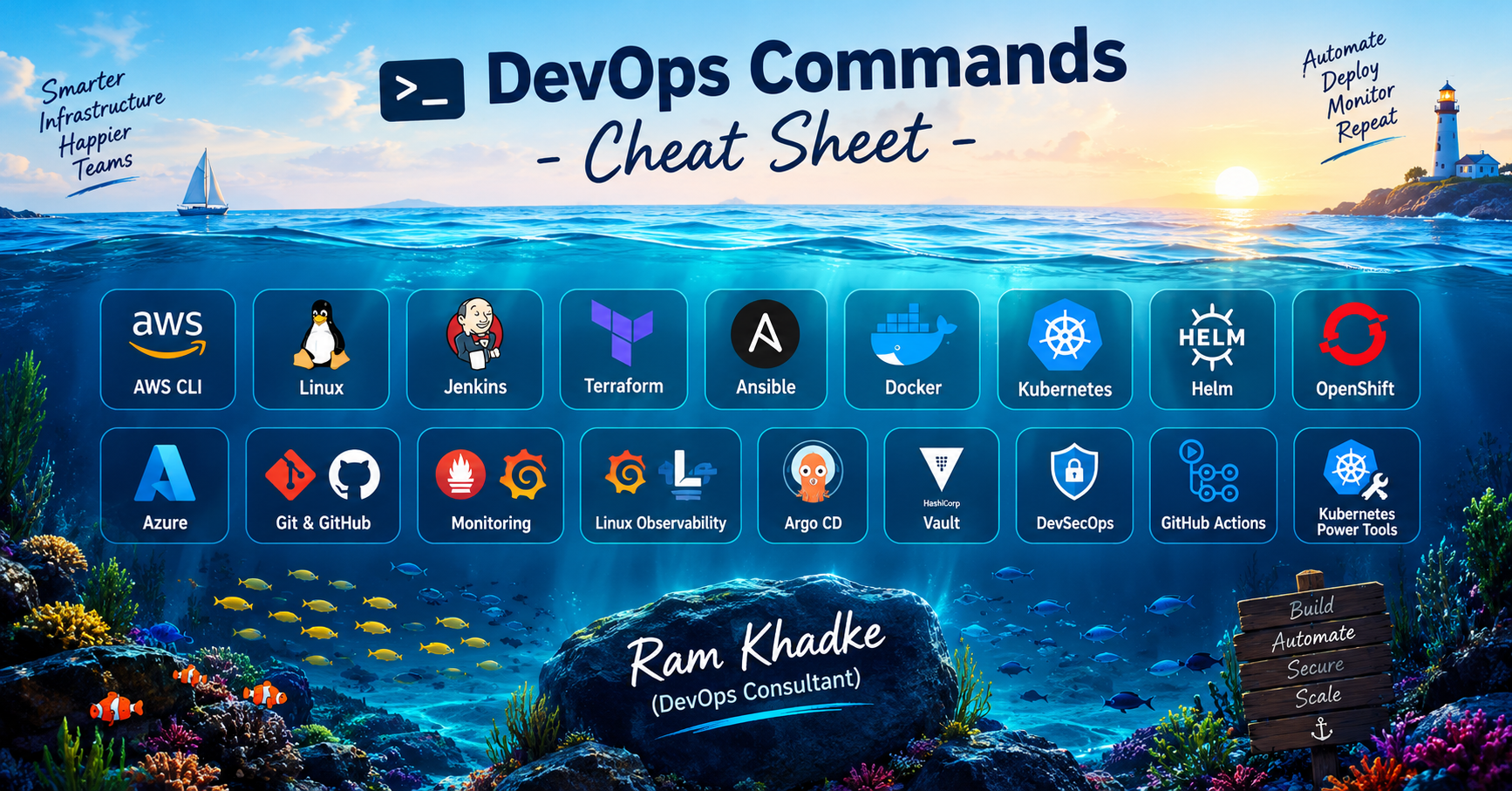
Production-ready commands for beginners and professionals - AWS CLI | Linux | Jenkins | Terraform | Ansible | Docker | Kubernetes | Helm | OpenShift | Azure | Git & GitHub | Monitoring | Linux Observability | Argo CD | Vault | DevSecOps | GitHub Actions | Kubernetes Power Tools
How to Use This Cheat Sheet
Every page shows commands exactly as you would type them in the terminal, with a short explanation on the right. If you are new to DevOps, follow the steps below.
<name> | GREEN text in angle brackets is a placeholder. Replace it (with the brackets) with your own value, e.g. <pod> becomes my-app-7d9f. |
--flag | BLUE text is an option / flag that changes how the command works. |
# comment | GREY text on the right explains what the command does. Do not type it. |
$ | The $ sign is the terminal prompt. Do not type it. Lines without $ are code snippets for a file (Jenkinsfile, YAML, HCL). |
Step-by-step: how to work safely in production
Step 1 - Confirm where you are. Check the account, cluster and namespace first: aws sts get-caller-identity, kubectl config current-context, az account show.
Step 2 - Read before you change. Use get / describe / list / plan / diff commands first. They only read and never modify anything.
Step 3 - Take a backup. Snapshot the disk or database, run terraform state pull, or back up the config file before a risky change.
Step 4 - Do a dry run. Use --dry-run, --check, terraform plan, helm --dry-run or kubectl diff to preview the exact change.
Step 5 - Change one thing at a time. Apply the change to dev first, then staging, then production. Use rolling updates and approvals.
Step 6 - Verify and watch. Check rollout status, logs, dashboards and alerts for a few minutes after the change.
Step 7 - Know your rollback. Before you start, know the undo command: kubectl rollout undo, helm rollback, terraform apply of the previous version, git revert.
Warning: commands marked "careful", "danger" or "force" can delete data or cause downtime. Always double-check before pressing Enter.
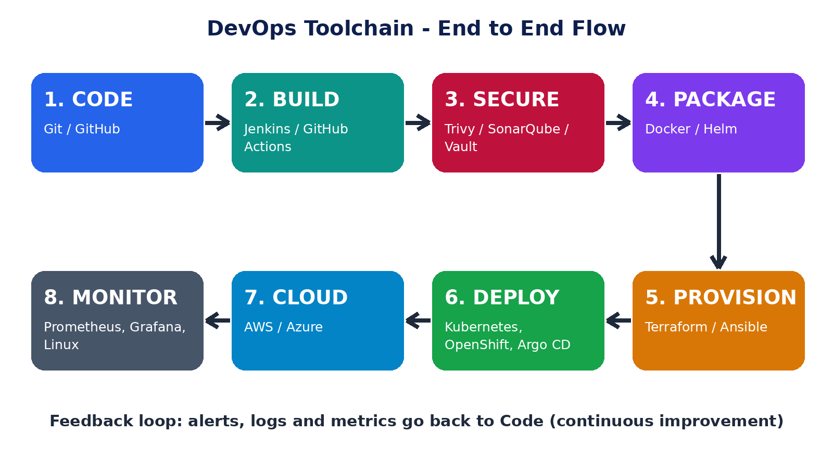
DevOps Toolchain Architecture
This diagram shows where each tool in this guide fits in the software delivery lifecycle - from writing code to monitoring it in production.
Index of Cheat Sheets
No. | Tool | What you will find |
1 | AWS CLI | 48 commands - Manage every AWS service from the terminal - the base skill for any cloud DevOps role. |
2 | Linux | 51 commands - Daily-use commands for servers: files, processes, services, network and troubleshooting. |
3 | Jenkins | 30 commands - CI/CD automation server - service control, CLI, API calls and Jenkinsfile (pipeline) essentials. |
4 | Terraform | 40 commands - Infrastructure as Code - plan, apply, state management and safe production practices. |
5 | Ansible | 44 commands - Agentless configuration management - ad-hoc commands, playbooks, vault, roles and inventory. |
6 | Docker | 48 commands - Build, ship and run containers - images, containers, volumes, networks, compose and cleanup. |
7 | Kubernetes | 49 commands - Production edition: nodes, pods, rollouts, rollback, debugging and cluster health. |
8 | Helm | 36 commands - Kubernetes package manager - install, upgrade, rollback and test applications with charts. |
9 | OpenShift (oc) | 49 commands - Red Hat OpenShift CLI - projects, routes, builds, cluster operators, SCC and node debugging. |
10 | Azure CLI | 41 commands - Manage Azure resources - subscriptions, VMs, AKS, ACR, storage, Key Vault, RBAC and web apps. |
11 | Git | 54 commands - Daily Git workflow plus the recovery commands you need when something goes wrong. |
12 | Monitoring Tools | 38 commands - Prometheus, PromQL, Alertmanager, Grafana, Loki and Elasticsearch - the commands used in on-call. |
13 | Linux Observability | 49 commands - Find CPU, memory, disk, network and application bottlenecks on a live server - USE method. |
14 | Argo CD & GitOps | 34 commands - GitOps continuous delivery for Kubernetes - Git is the single source of truth. |
15 | HashiCorp Vault | 34 commands - Secrets management - store, rotate and audit secrets, dynamic credentials and backups. |
16 | DevSecOps Tools | 28 commands - Shift-left security - scan images, code, IaC, dependencies, secrets and sign artifacts in CI/CD. |
17 | GitHub Actions | 34 commands - CI/CD workflow syntax - triggers, jobs, secrets, OIDC to cloud, approvals and reusable patterns. |
18 | Kubernetes Power Tools | 38 commands - Ecosystem tools top companies use daily - k9s, stern, kubectx, Kustomize, Istio, cert-manager, Karpenter, KEDA. |
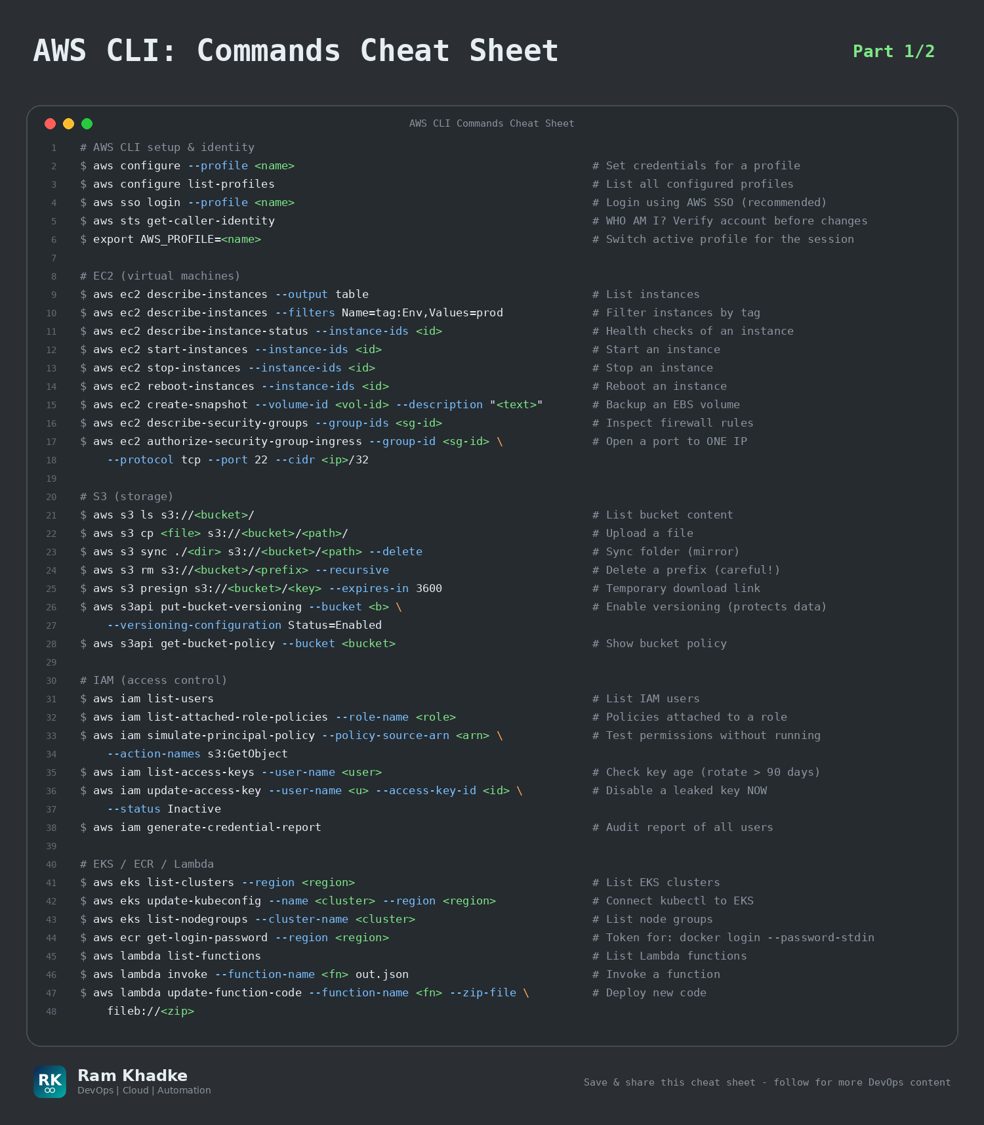
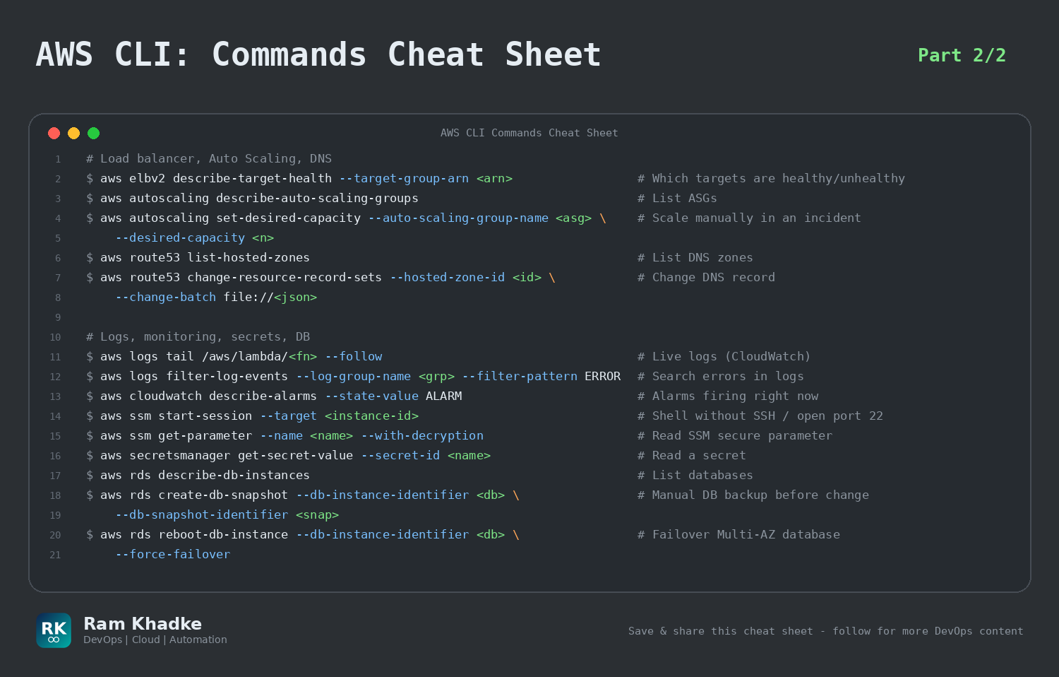
1. AWS CLI (Part 1/2)
Manage every AWS service from the terminal - the base skill for any cloud DevOps role.
Production Golden Rules | • Always run 'aws sts get-caller-identity' BEFORE any change - confirm you are in the right account/role. | • Use '--dry-run' (EC2) and '--query' + '--output table' to preview and filter results safely. | • Never hard-code access keys. Use SSO / IAM roles / OIDC and rotate keys regularly. | • Take a snapshot (EBS / RDS) before any risky production change. |
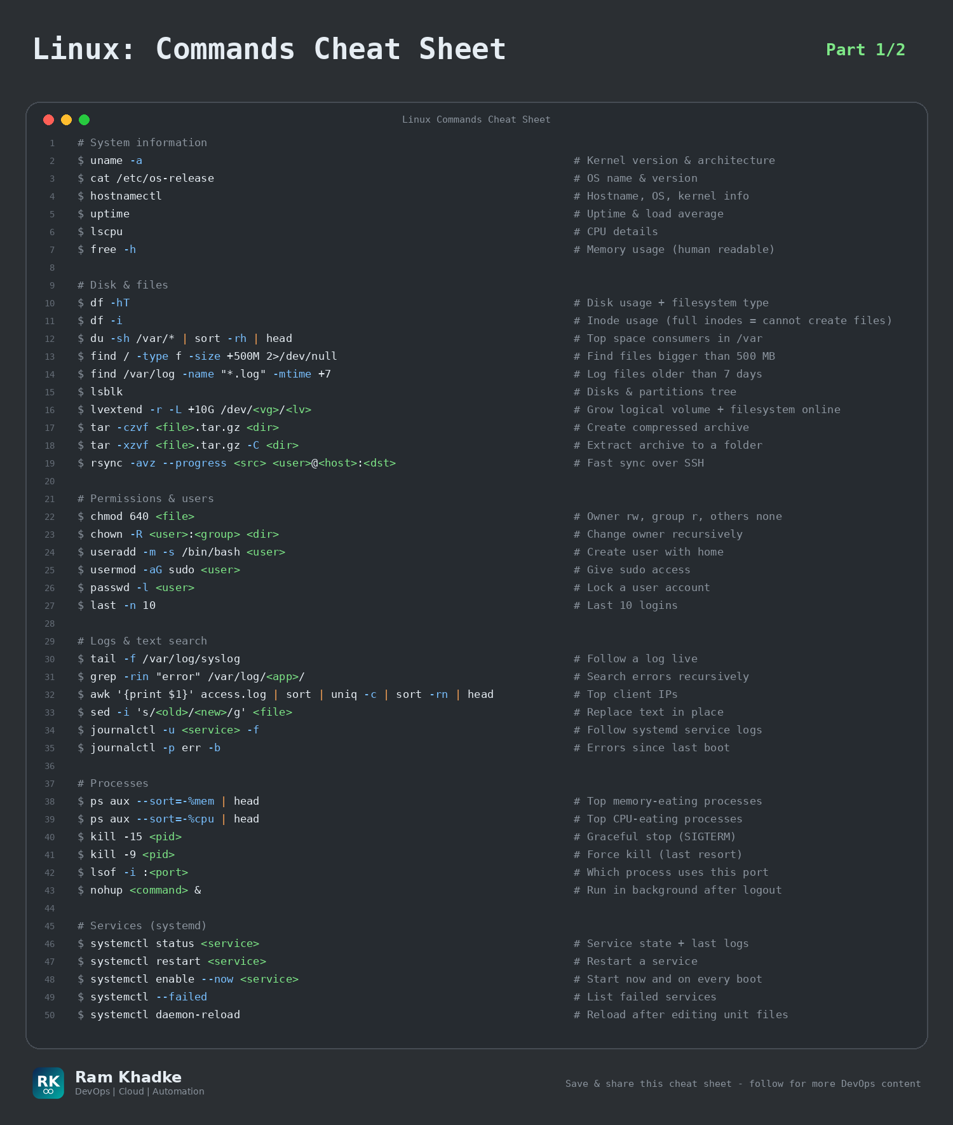
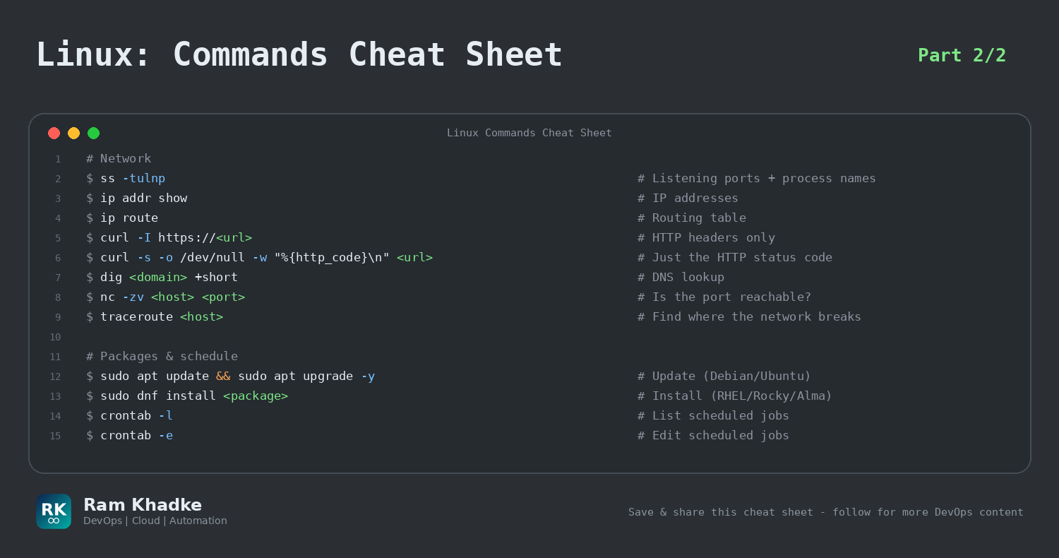
2. Linux (Part 1/2)
Daily-use commands for servers: files, processes, services, network and troubleshooting.
Production Golden Rules | • 'df -h' shows free space but 'df -i' shows free inodes - a server can be 'full' with space left. | • Use 'kill -15' (graceful) first. Use 'kill -9' only as last resort - it can corrupt data. | • Always take a backup (cp -a / tar) before editing config files in /etc. | • Use 'journalctl -u <service>' first when a service fails - the reason is almost always there. |
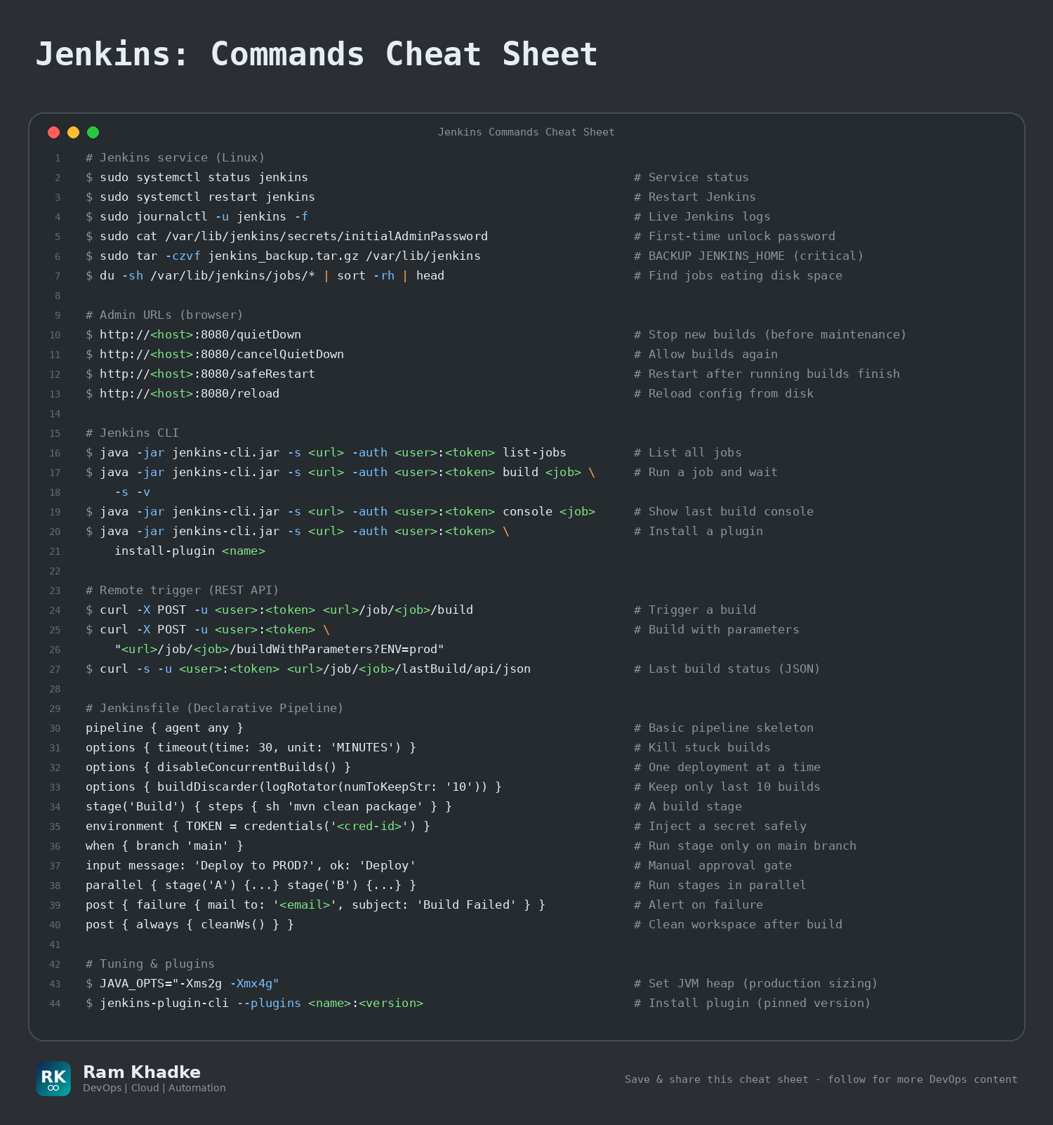
3. Jenkins
CI/CD automation server - service control, CLI, API calls and Jenkinsfile (pipeline) essentials.
Production Golden Rules | • Back up JENKINS_HOME (/var/lib/jenkins) regularly - it holds all jobs, credentials and config. | • Use 'safeRestart' (not 'restart') so running builds finish first. | • Never print secrets in logs - use credentials() / withCredentials() and keep 'mask passwords' on. | • Add an 'input' approval step and 'disableConcurrentBuilds()' for production deployments. |
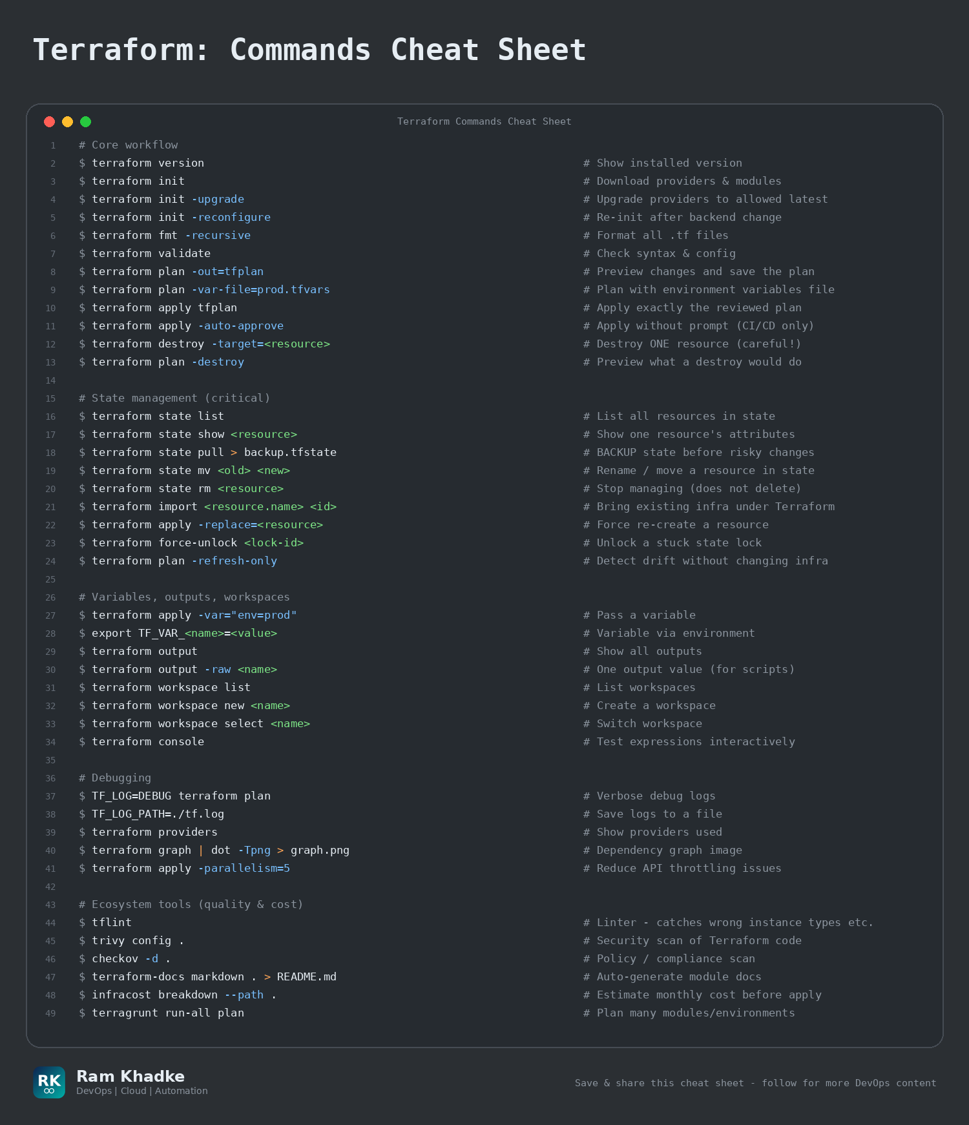
4. Terraform
Infrastructure as Code - plan, apply, state management and safe production practices.
Production Golden Rules | • ALWAYS run 'terraform plan -out=tfplan' and review it before 'apply tfplan'. | • Keep state in a remote backend (S3 + DynamoDB lock / Terraform Cloud) with versioning enabled. | • Use 'state pull > backup.tfstate' before any 'state mv/rm' operation. | • Use '-target' only for emergencies - it can leave your infrastructure out of sync. |
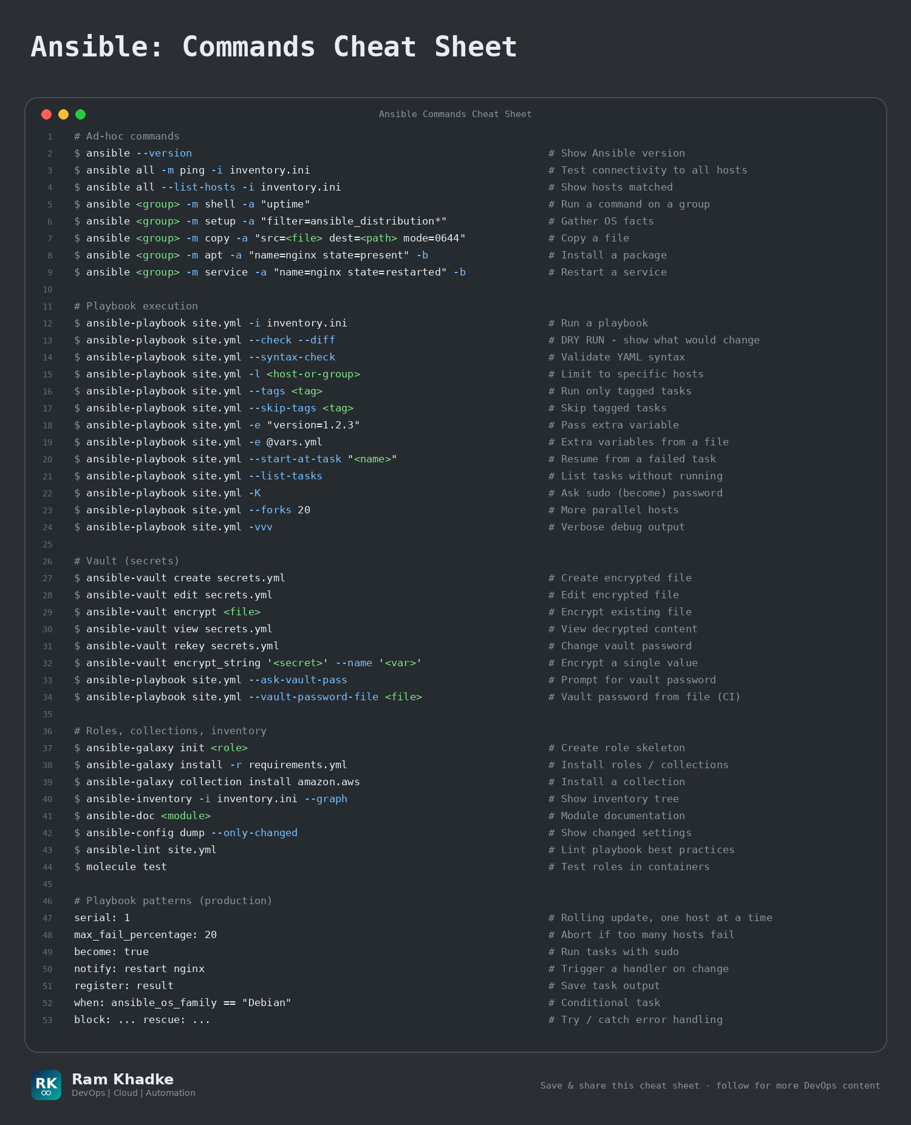
5. Ansible
Agentless configuration management - ad-hoc commands, playbooks, vault, roles and inventory.
Production Golden Rules | • Always dry-run first: 'ansible-playbook site.yml --check --diff'. | • Use 'serial: 1' (rolling update) and 'max_fail_percentage' so one bad host does not take down production. | • Encrypt every secret with ansible-vault - never commit plain passwords to Git. | • Write idempotent tasks (use modules, not raw shell) so playbooks are safe to re-run. |
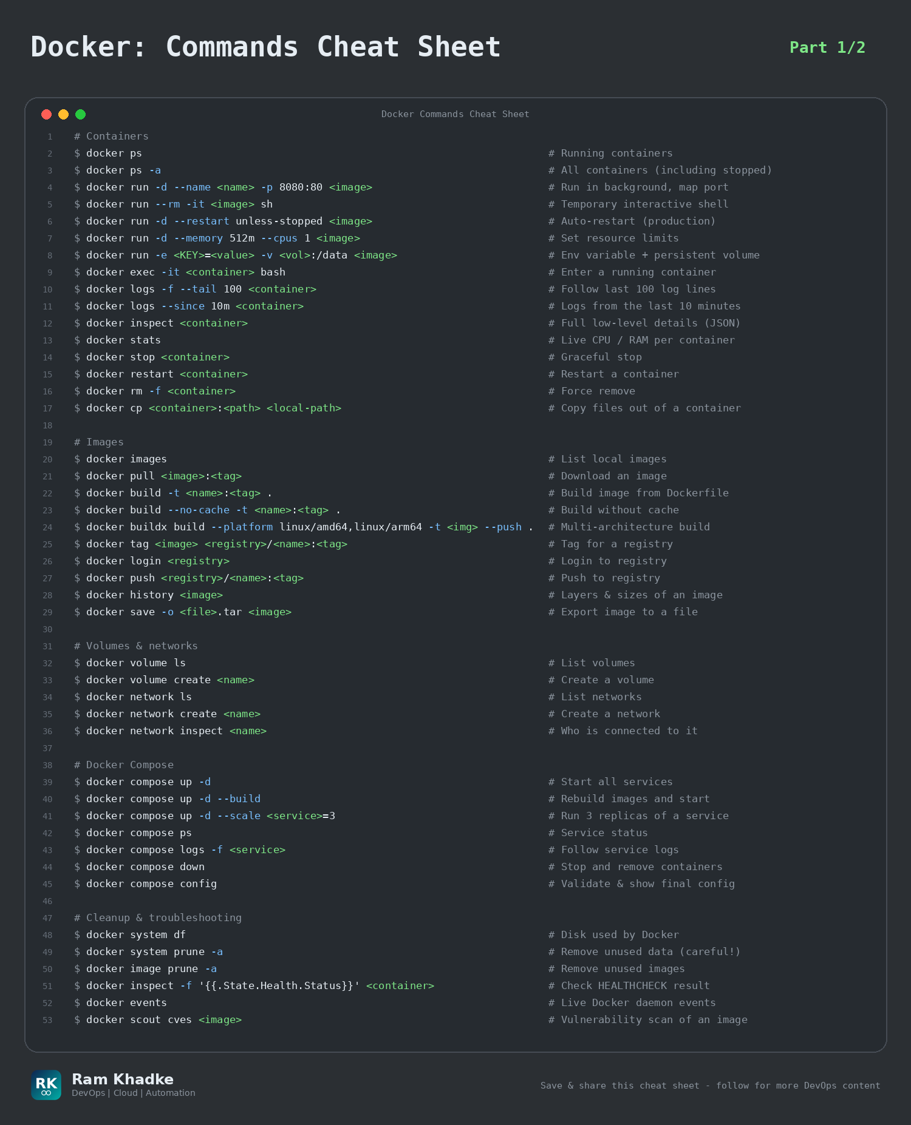
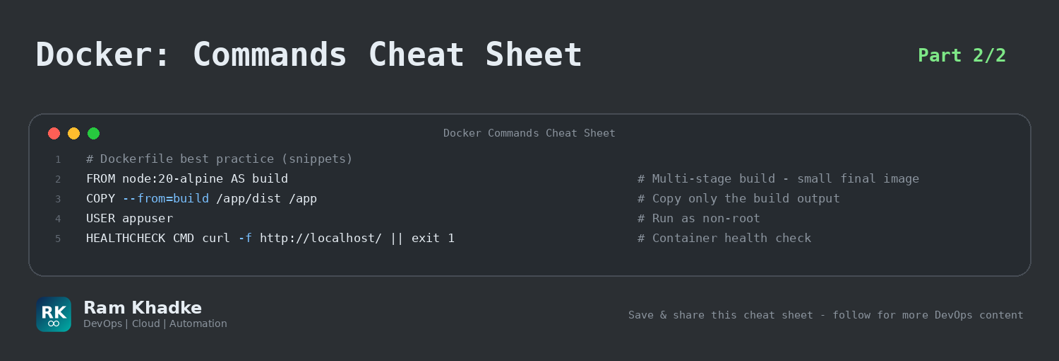
6. Docker (Part 1/2)
Build, ship and run containers - images, containers, volumes, networks, compose and cleanup.
Production Golden Rules | • Never run containers as root - add 'USER appuser' in the Dockerfile and use a small base image. | • Always set '--restart unless-stopped' and memory/CPU limits for production containers. | • 'docker system prune -af --volumes' DELETES unused volumes (data!). Check before running. | • Pin image tags (nginx:1.27) - never use ':latest' in production. Scan images with Trivy. |
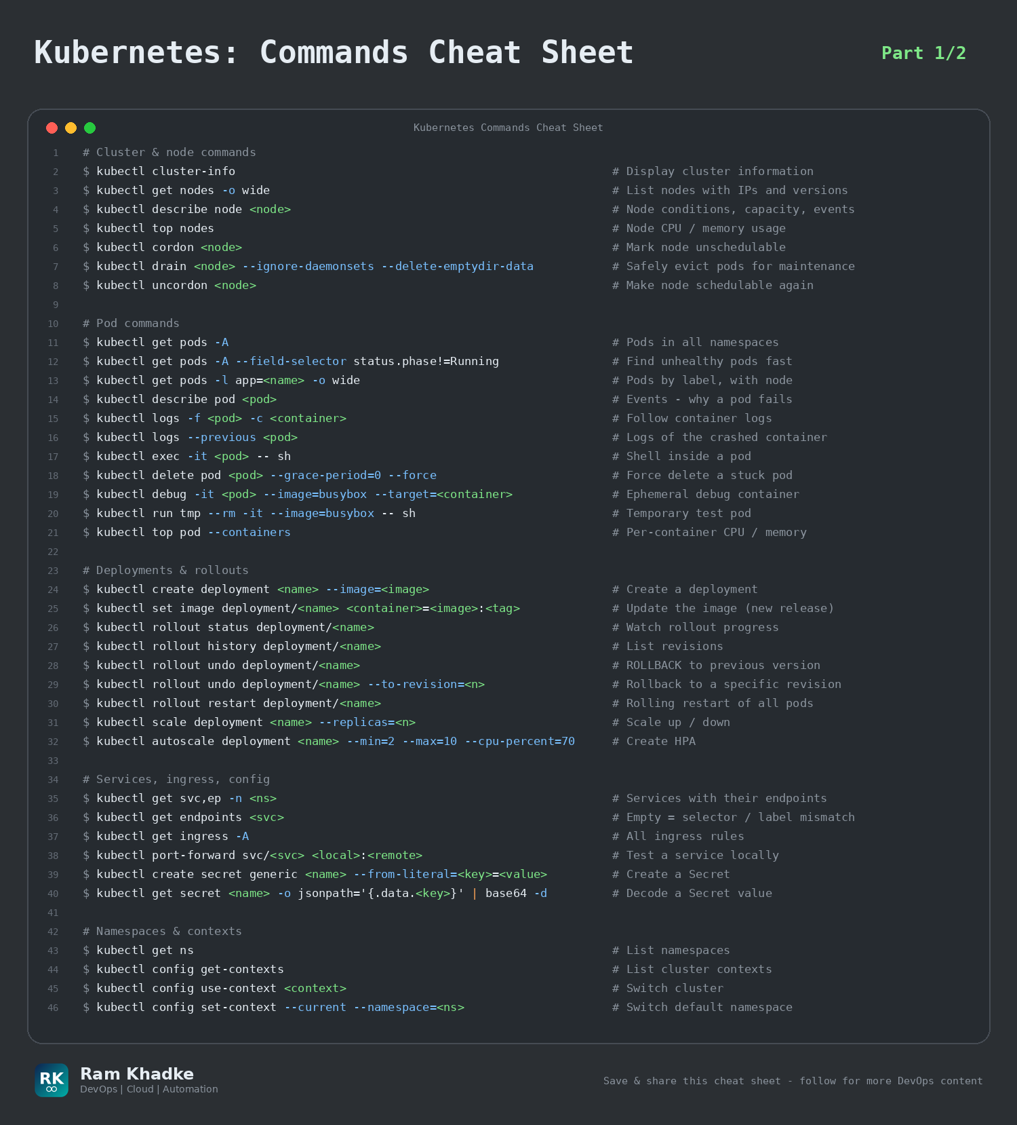
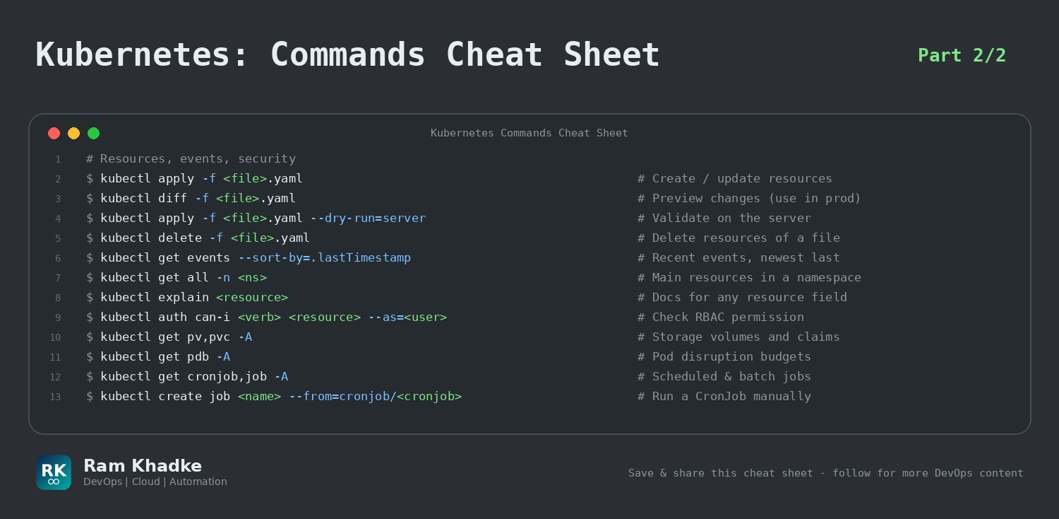
7. Kubernetes (Part 1/2)
Production edition: nodes, pods, rollouts, rollback, debugging and cluster health.
Production Golden Rules | • Rollback fast: 'kubectl rollout undo deployment/<name>' - the first thing to try after a bad release. | • CrashLoopBackOff? Use 'kubectl logs --previous <pod>' and 'kubectl describe pod <pod>' (check Events). | • Always 'cordon' + 'drain' a node before maintenance. Set PodDisruptionBudgets for critical apps. | • Use 'kubectl diff -f' and '--dry-run=server' before 'apply' in production. |
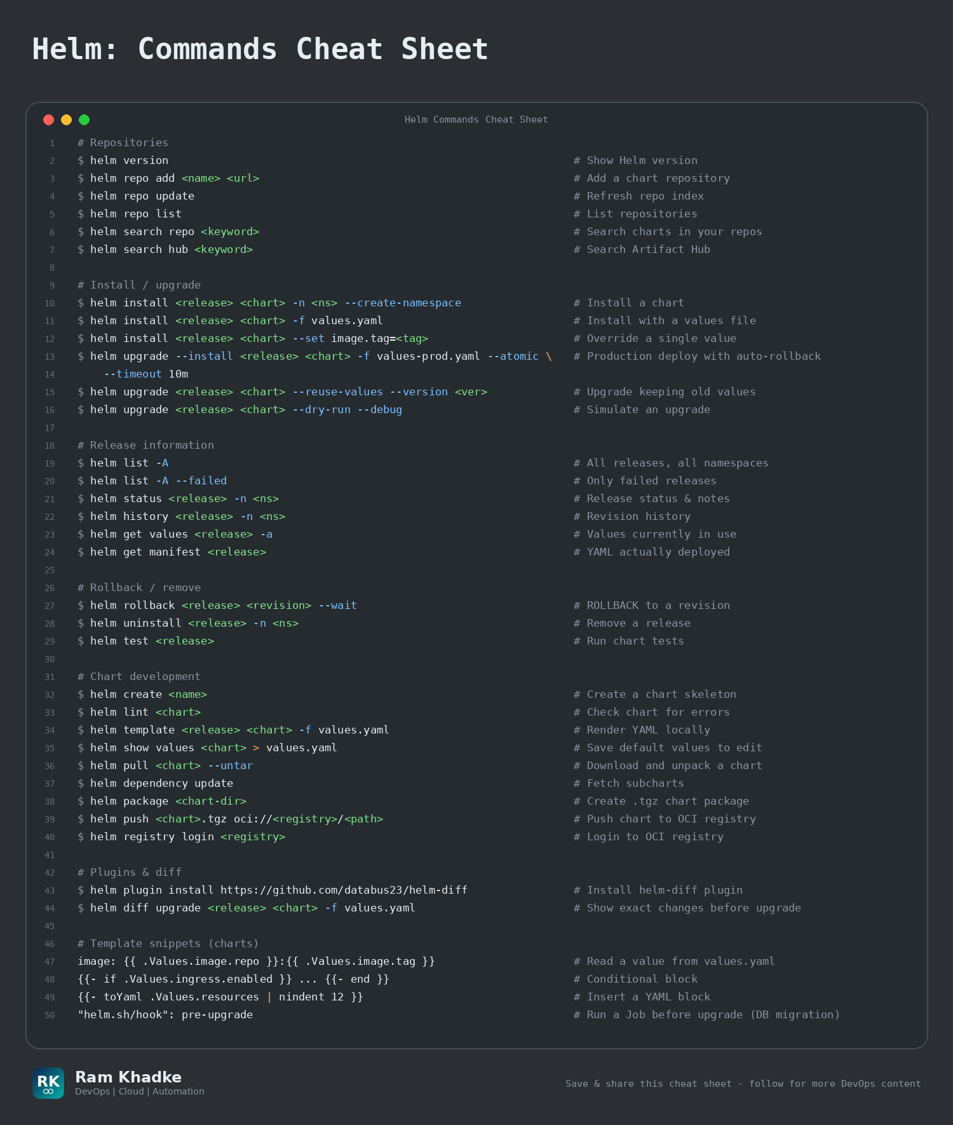
8. Helm
Kubernetes package manager - install, upgrade, rollback and test applications with charts.
Production Golden Rules | • Use 'helm upgrade --install --atomic --timeout 10m' - it auto-rolls back if the release fails. | • Preview with 'helm diff upgrade' (plugin) or '--dry-run --debug' before touching production. | • Keep one values file per environment (values-dev.yaml, values-prod.yaml) in Git. | • Pin chart versions with '--version' so deployments are repeatable. |
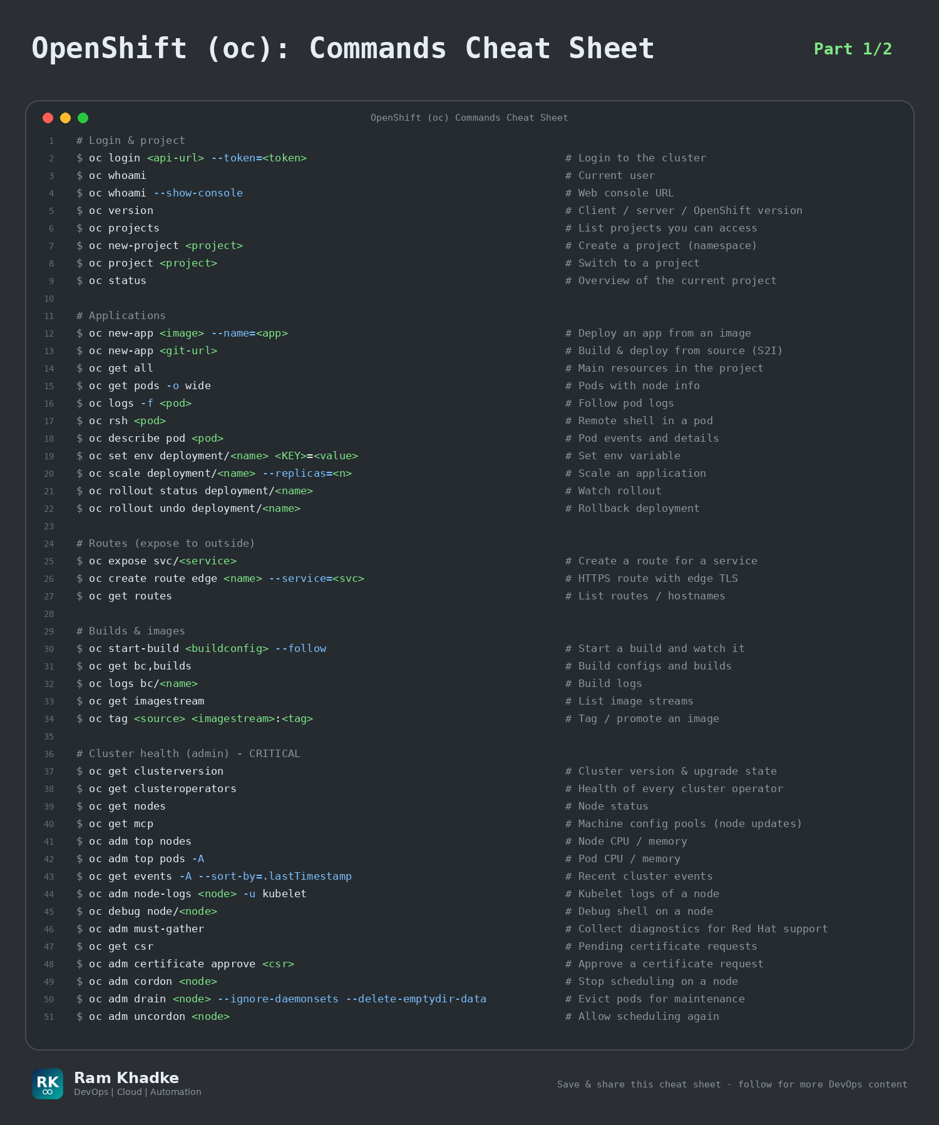
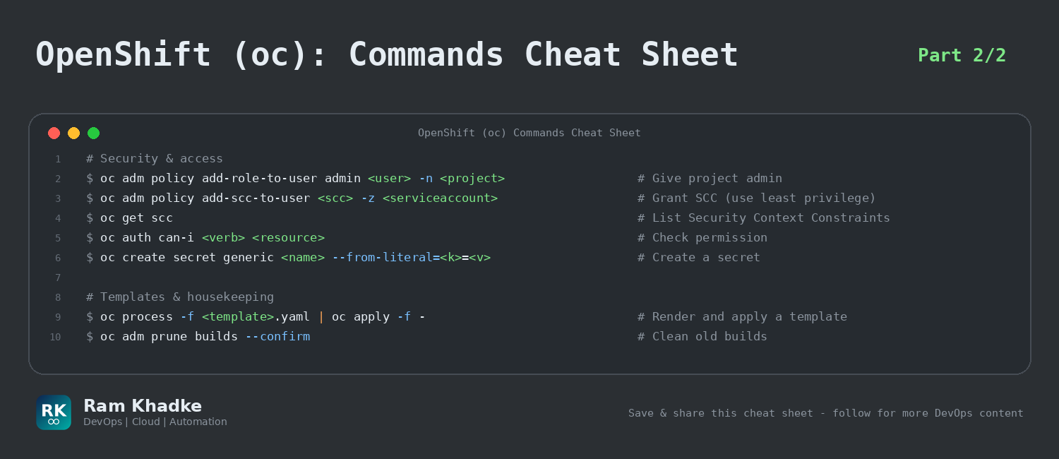
9. OpenShift (oc) (Part 1/2)
Red Hat OpenShift CLI - projects, routes, builds, cluster operators, SCC and node debugging.
Production Golden Rules | • After any upgrade check 'oc get clusteroperators' - all should be Available=True, Degraded=False. | • Use 'oc debug node/<node>' to troubleshoot nodes - no SSH needed. | • Run 'oc adm must-gather' and attach it to Red Hat support cases. | • Avoid 'anyuid' / 'privileged' SCC - give the least privilege that works. |
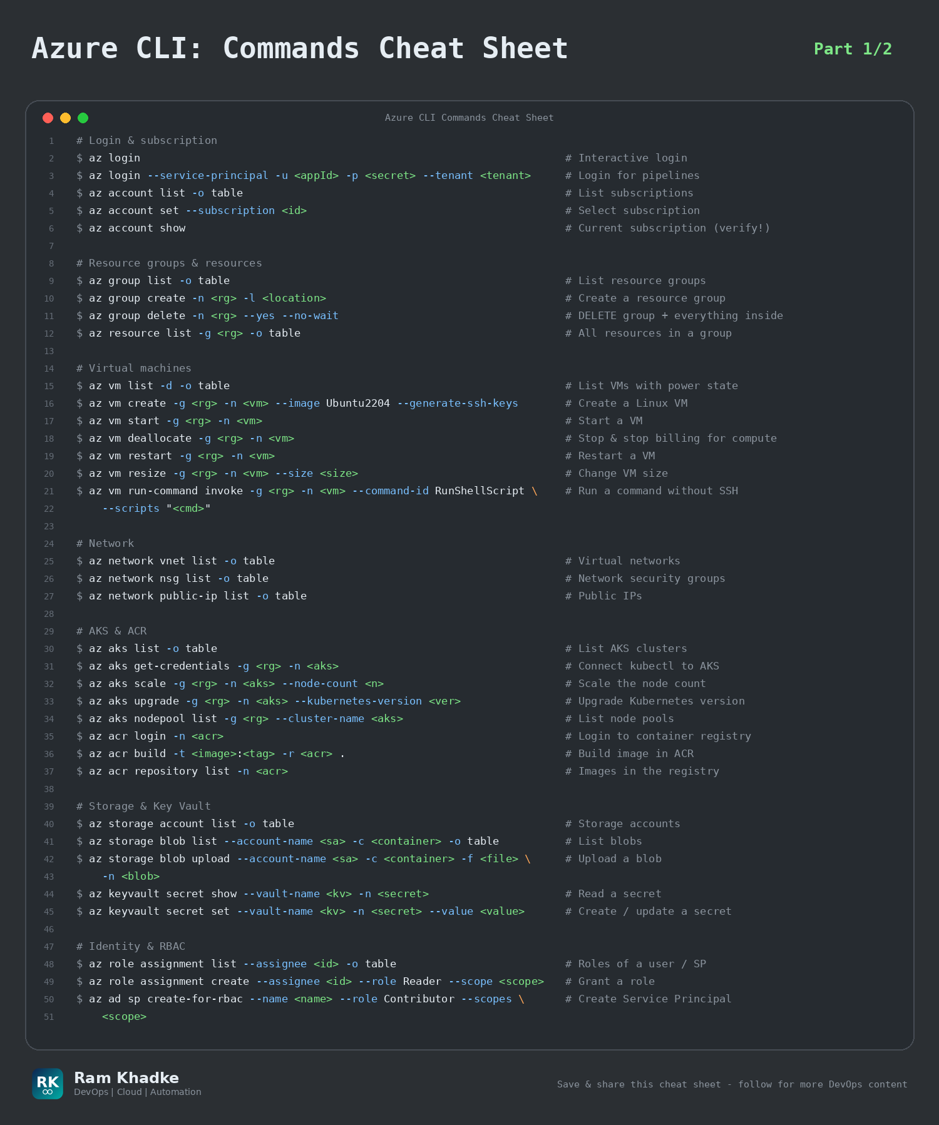
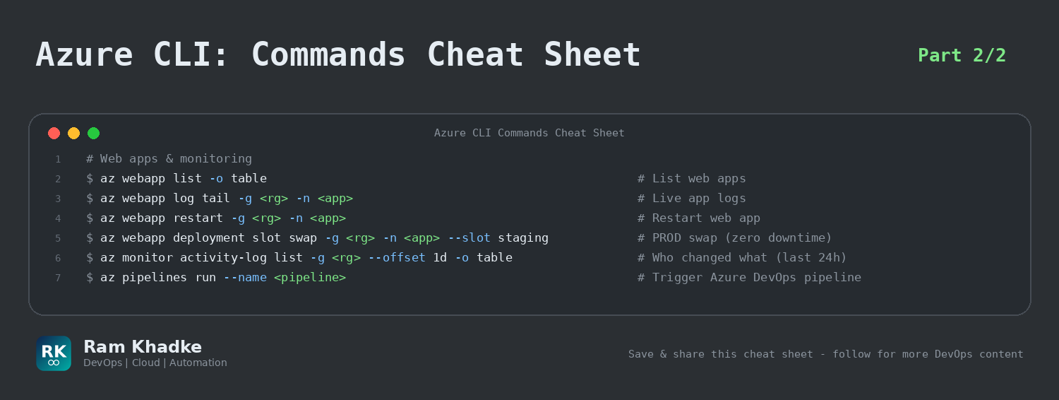
10. Azure CLI (Part 1/2)
Manage Azure resources - subscriptions, VMs, AKS, ACR, storage, Key Vault, RBAC and web apps.
Production Golden Rules | • Check 'az account show' before every change - wrong subscription is the #1 Azure mistake. | • 'az group delete' removes EVERYTHING inside the group. Use resource locks on production. | • Use Managed Identity / Service Principal with least-privilege RBAC - not personal accounts in pipelines. | • Use deployment slots (staging -> swap) for zero-downtime web app releases. |
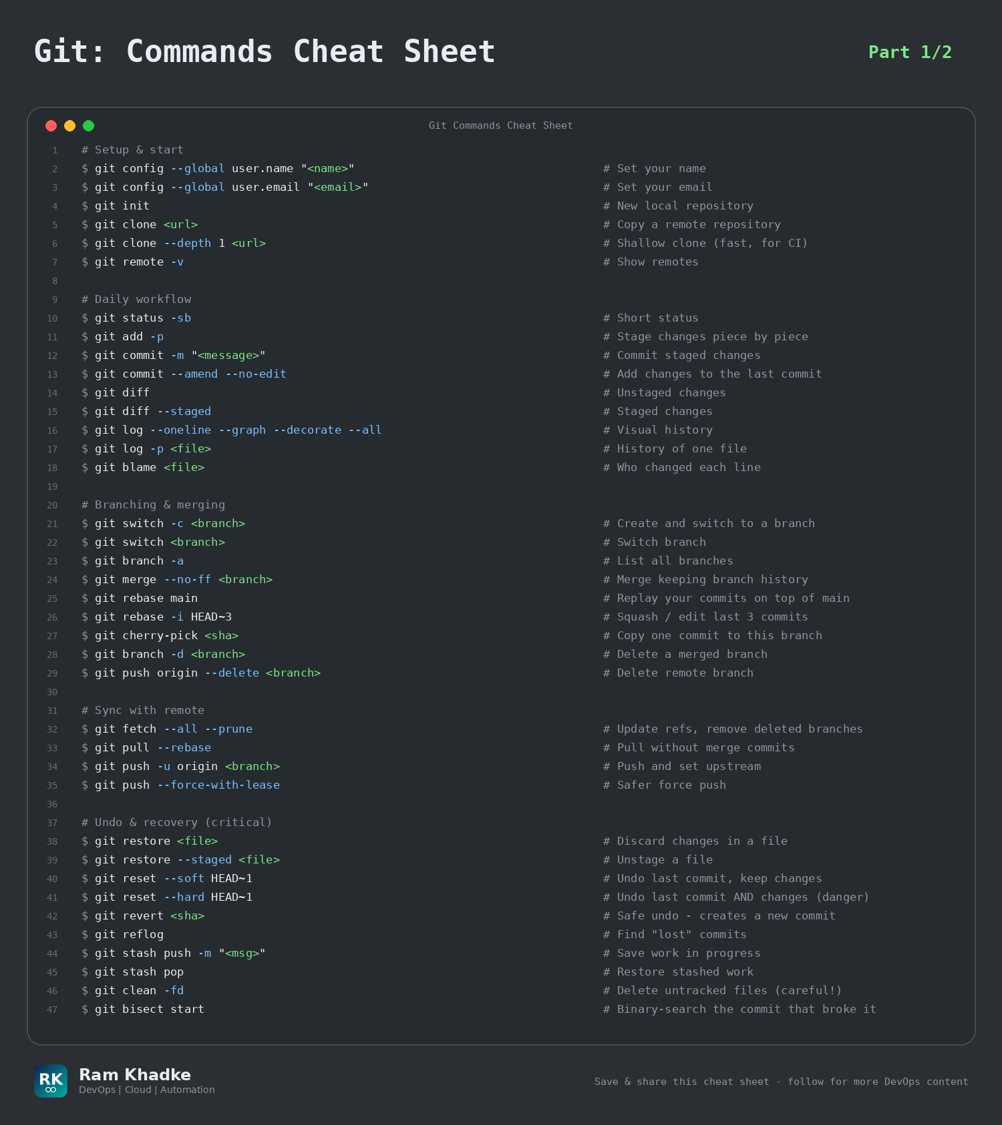
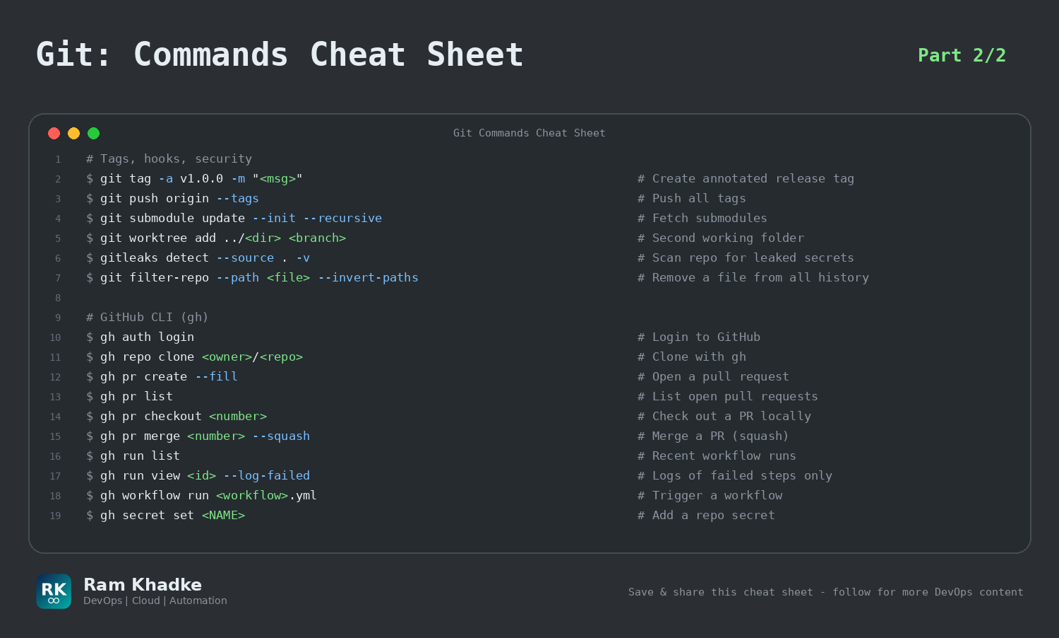
11. Git (Part 1/2)
Daily Git workflow plus the recovery commands you need when something goes wrong.
Production Golden Rules | • Never 'git push --force' on shared branches - use '--force-with-lease'. | • 'git reflog' can bring back 'lost' commits after a bad reset or rebase. | • Use 'git revert <sha>' to undo a commit on main (history stays clean and safe). | • Committed a secret? Rotate it immediately - then clean history with git filter-repo. |
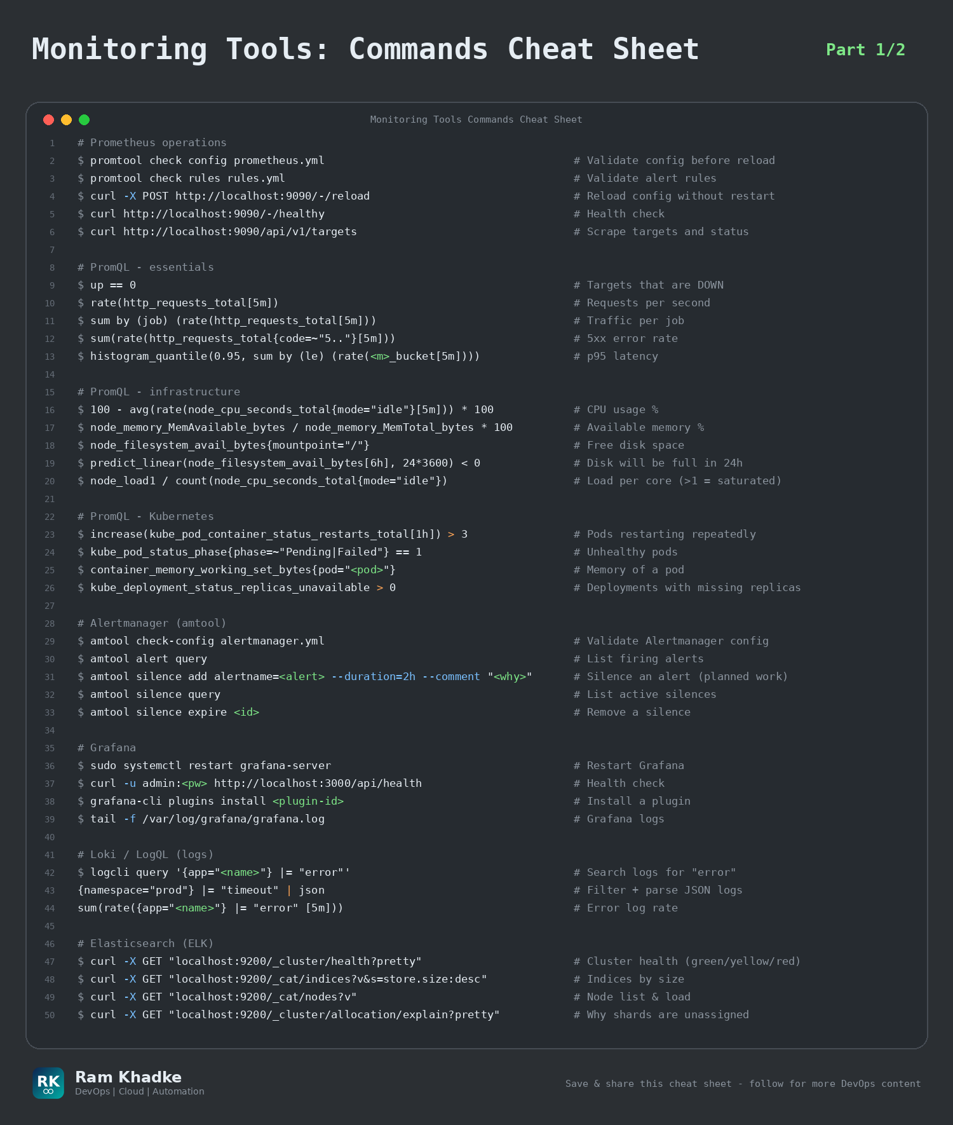
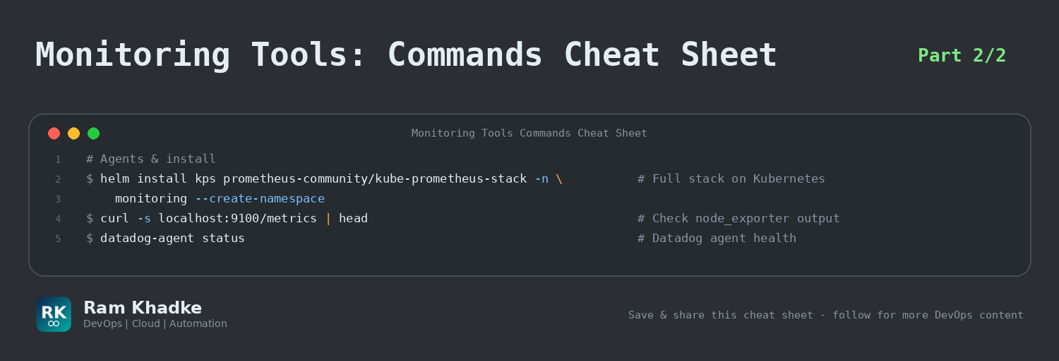
12. Monitoring Tools (Part 1/2)
Prometheus, PromQL, Alertmanager, Grafana, Loki and Elasticsearch - the commands used in on-call.
Production Golden Rules | • Watch the 4 Golden Signals: Latency, Traffic, Errors, Saturation. | • Alert on symptoms users feel (error rate, latency) - not only on CPU / memory. | • Always validate config with 'promtool check config / rules' BEFORE reloading Prometheus. | • Add a '--comment' when creating silences so the next engineer knows why. |
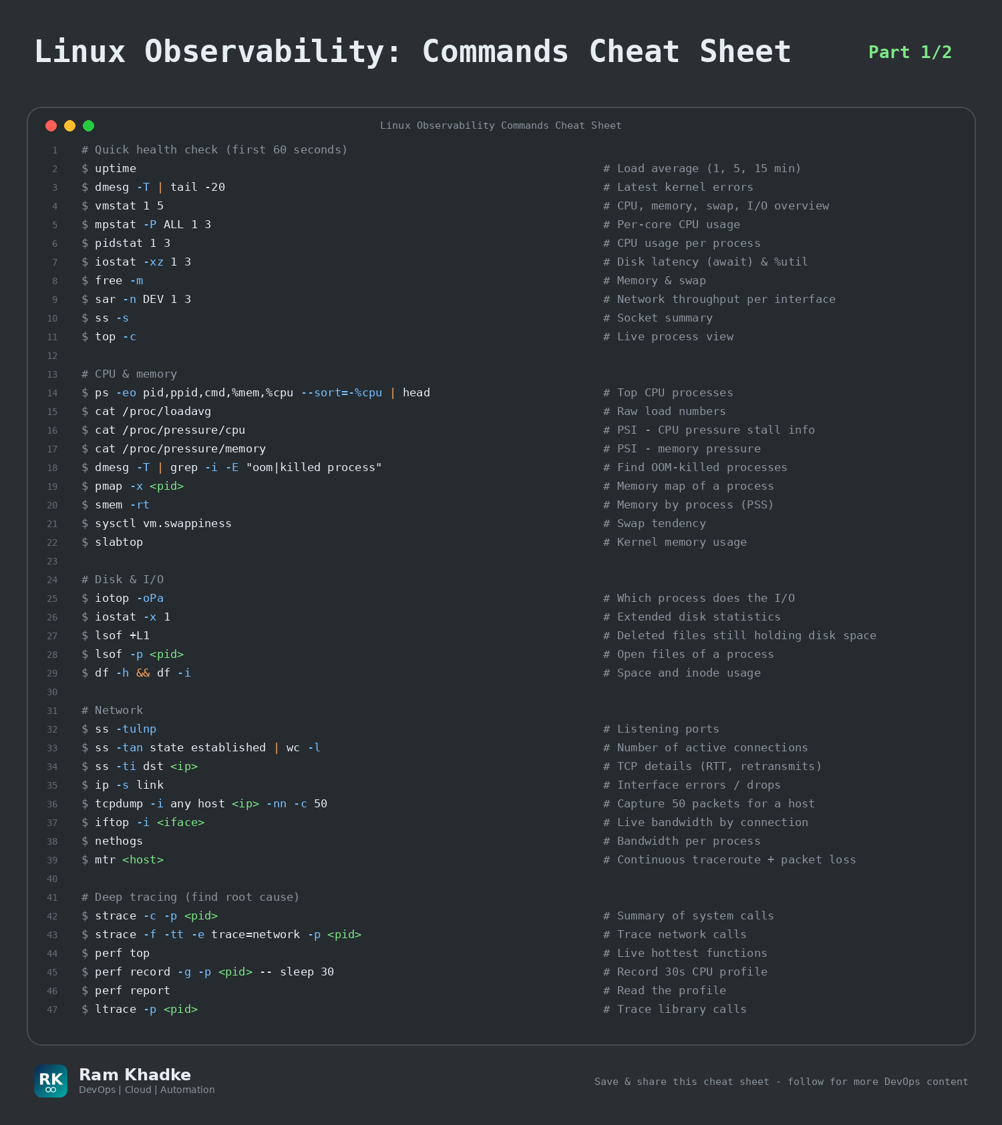
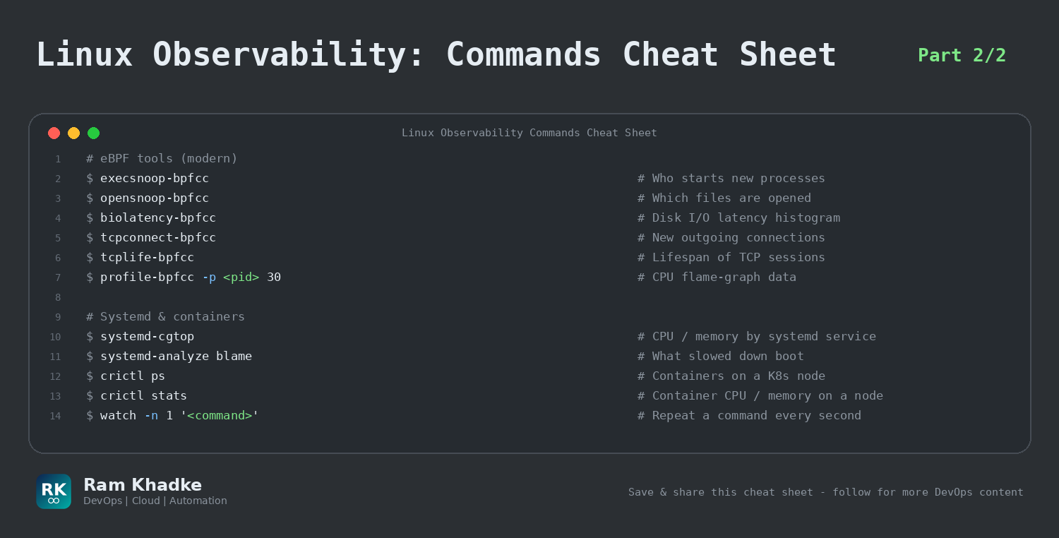
13. Linux Observability (Part 1/2)
Find CPU, memory, disk, network and application bottlenecks on a live server - USE method.
Production Golden Rules | • USE method: for every resource check Utilization, Saturation and Errors. | • Load average higher than CPU cores = saturation. Check 'vmstat 1' column 'r' and 'wa'. | • Disk full but 'du' shows less? A deleted file is still open - find it with 'lsof +L1'. | • OOM kills? 'dmesg -T | grep -i oom' tells exactly which process was killed. |
14. Argo CD & GitOps
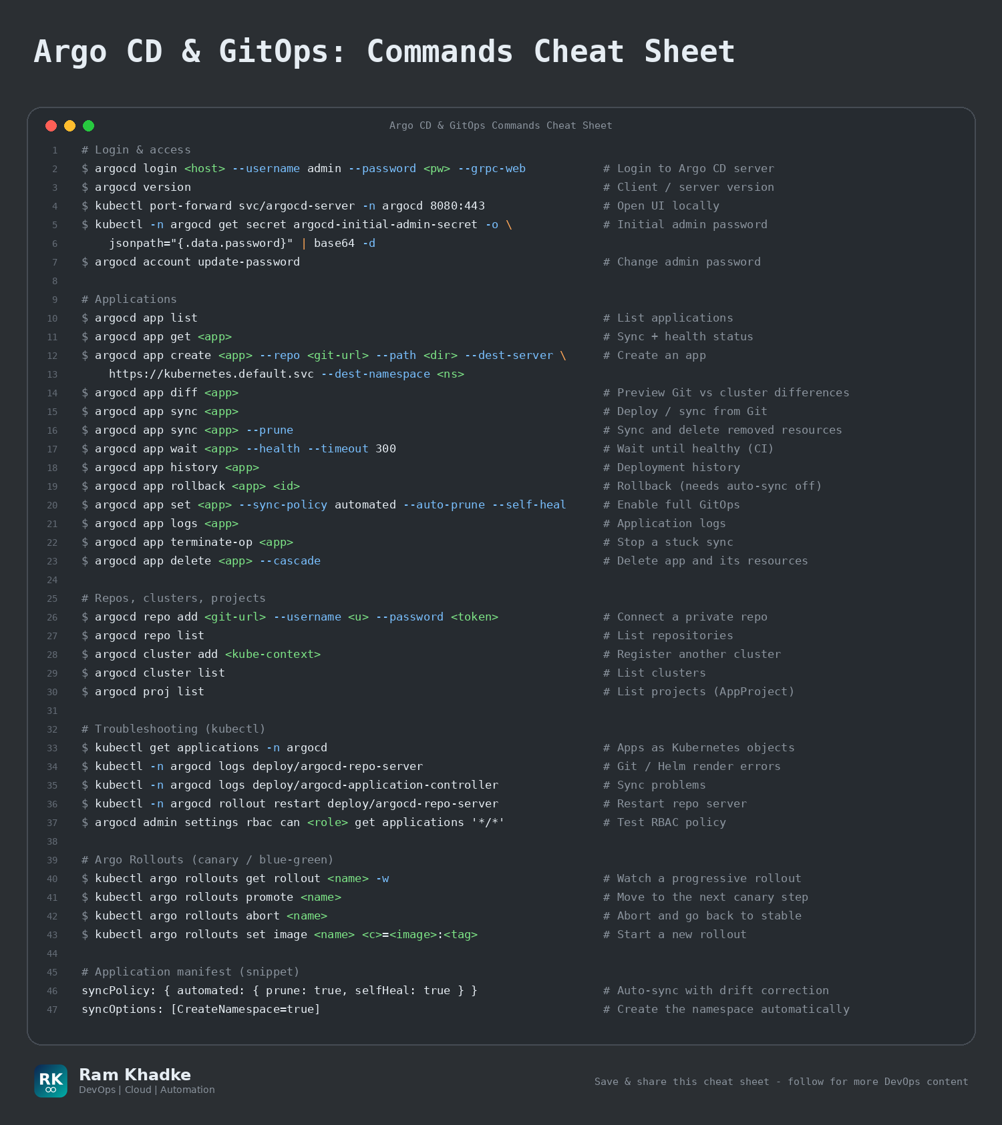
GitOps continuous delivery for Kubernetes - Git is the single source of truth.
Production Golden Rules | • Enable 'automated' sync with 'selfHeal' and 'prune' so manual cluster changes are reverted. | • Rollback by 'git revert' in the config repo - that is the real GitOps way. | • Use 'argocd app diff' before sync to see exactly what will change in prod. | • Use separate Projects (AppProject) to limit which repos / namespaces a team can deploy to. |
15. HashiCorp Vault
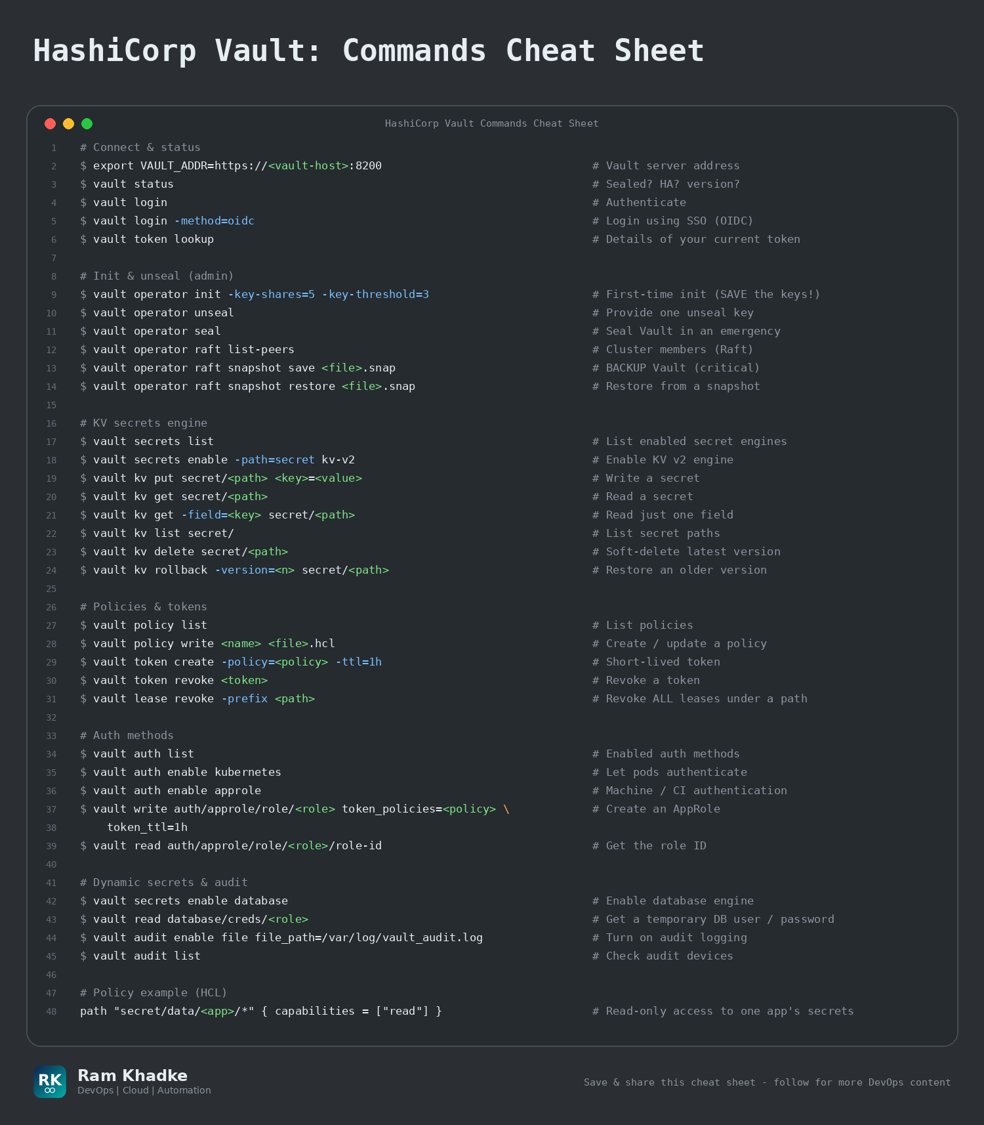
Secrets management - store, rotate and audit secrets, dynamic credentials and backups.
Production Golden Rules | • Take Raft snapshots regularly: 'vault operator raft snapshot save'. Test the restore. | • Enable an audit device on day one - you need it for every security investigation. | • Prefer dynamic (short-lived) credentials over static passwords. | • Leaked token? 'vault token revoke' or 'vault lease revoke -prefix <path>' immediately. |
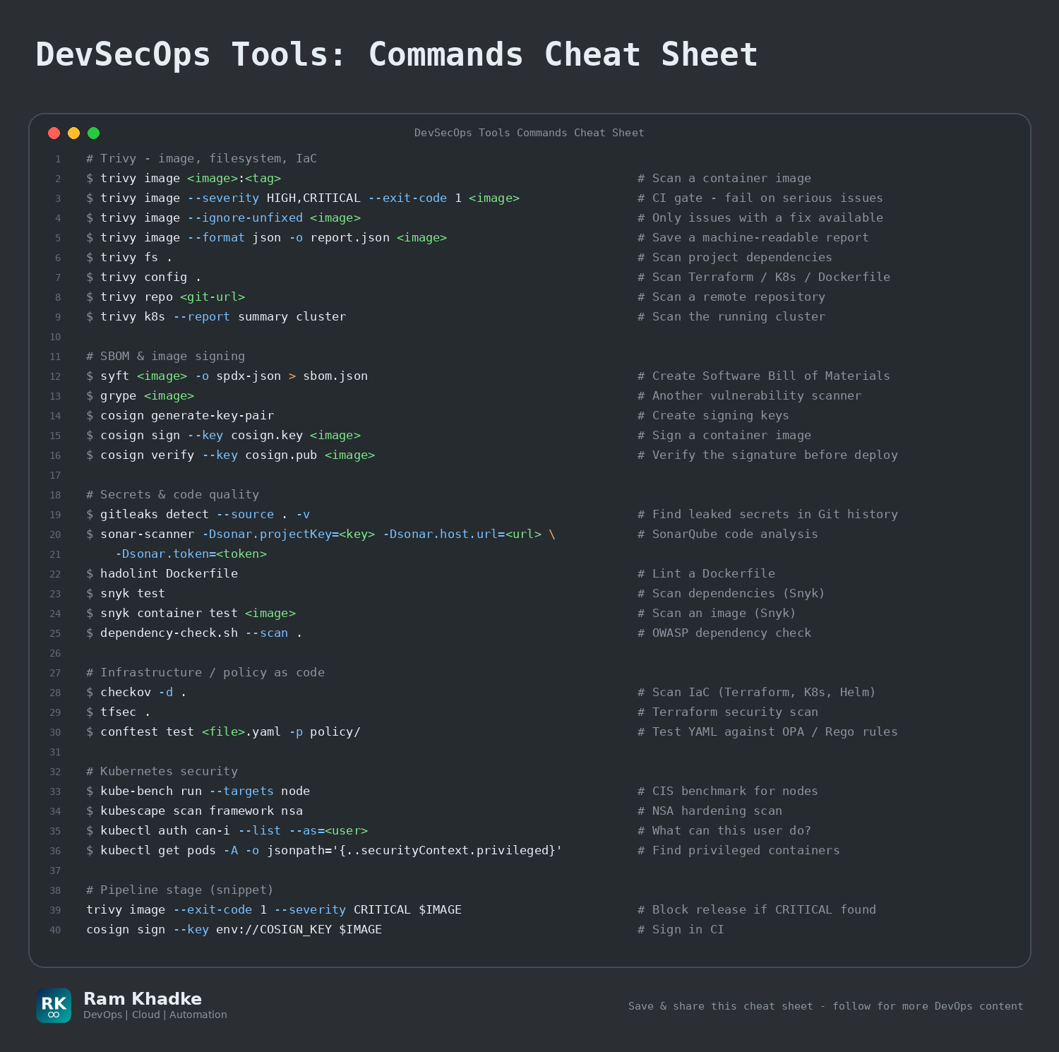
16. DevSecOps Tools
Shift-left security - scan images, code, IaC, dependencies, secrets and sign artifacts in CI/CD.
Production Golden Rules | • Fail the pipeline on HIGH / CRITICAL findings: 'trivy image --exit-code 1 --severity HIGH,CRITICAL'. | • Scan at 3 points: source code (SAST / secrets), build (dependencies, images) and runtime (cluster). | • Generate an SBOM for every release and sign images with cosign. | • Use '--ignore-unfixed' to focus the team on vulnerabilities that actually have a fix. |
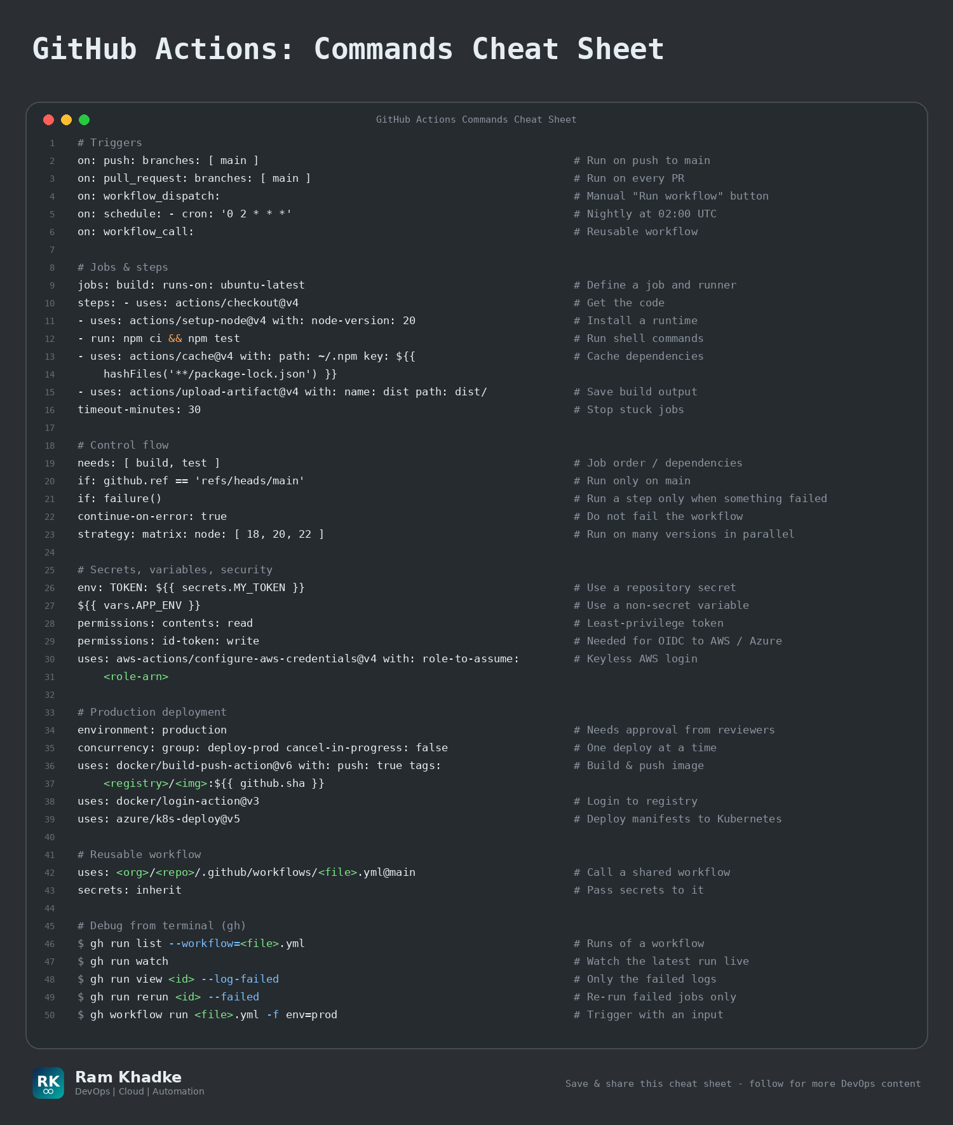
17. GitHub Actions
CI/CD workflow syntax - triggers, jobs, secrets, OIDC to cloud, approvals and reusable patterns.
Production Golden Rules | • Use OIDC ('id-token: write') to assume cloud roles - no long-lived cloud keys in secrets. | • Pin third-party actions to a commit SHA and set minimal 'permissions'. | • Protect production with 'environment: production' + required reviewers (manual approval). | • Add 'concurrency' so two deployments never run at the same time. |
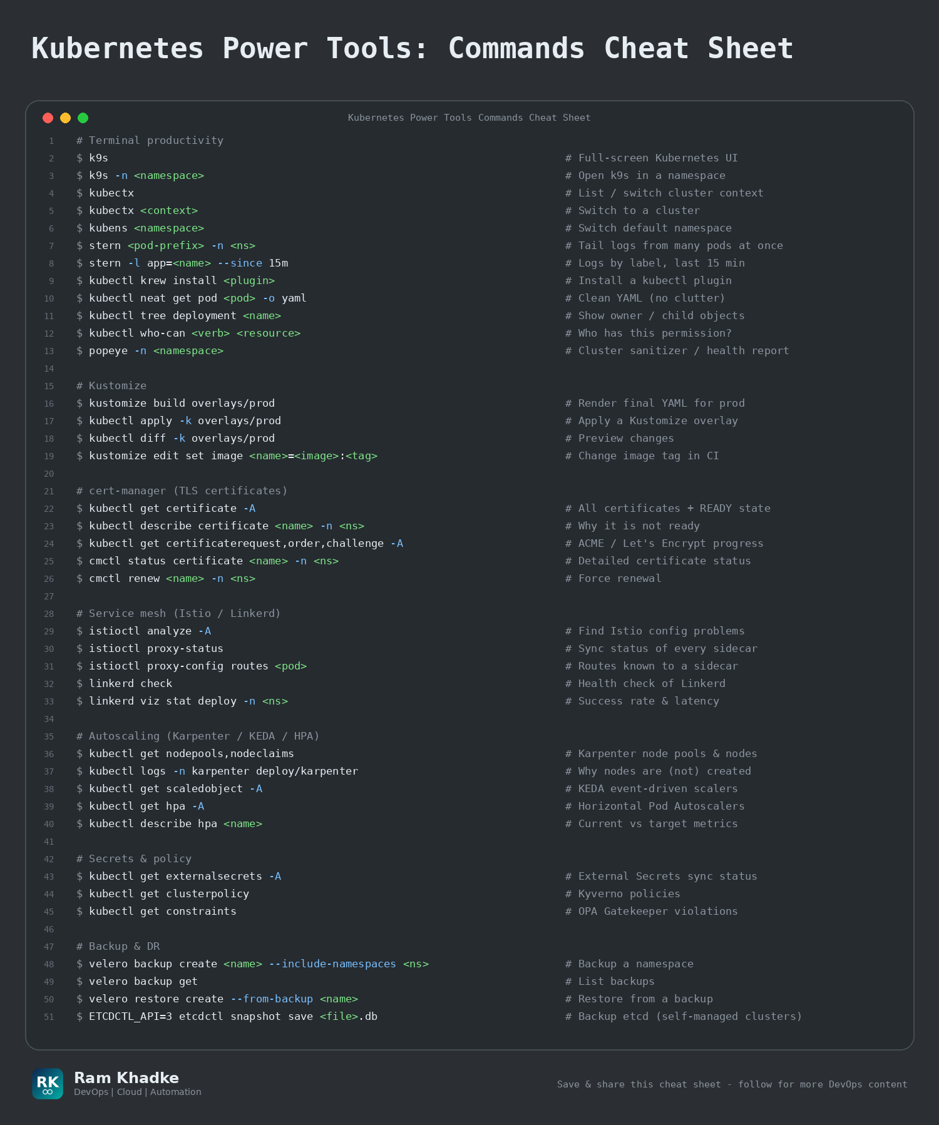
18. Kubernetes Power Tools
Ecosystem tools top companies use daily - k9s, stern, kubectx, Kustomize, Istio, cert-manager, Karpenter, KEDA.
Production Golden Rules | • k9s + stern + kubectx/kubens save hours during an incident - install them on day one. | • Use Kustomize overlays (base + dev / prod) to avoid copy-pasting YAML. | • Expired certificate = outage. Always monitor cert-manager 'Certificate' objects. | • Use Karpenter / Cluster Autoscaler + KEDA to scale nodes and pods on real demand. |
Author: Ram Khadke ( DevOps Consultant )
About the author
- DevOps Engineer - Professional with significant experience in optimizing cloud infrastructure and streamlining deployment pipelines. Strong focus on collaboration and achieving results, adaptable to evolving project needs. Skilled in CI/CD, configuration management, and automation tools. Reliable team player known for problem-solving and delivering impactful solutions. Handling security breaches, Application Workloads, Traffic Controls. Collaborating multiple teams and enjoy the movement.
Comments
Join the discussionNo comments yet. Be the first to comment.